🎮 Play Solomon’s Key (Europe) Online (NES)

🎲 NEXT RANDOM GAME
Solomon’s Key (Europe) cover art
SAVE SLOTS:

đŸ•šī¸ GAME CONTROLS

Action / ButtonKeyboard Key
D-Pad (Up / Down / Left / Right)Arrow Keys
Button AZ or J
Button BX or K
Button X / Turbo AA or U
Button Y / Turbo BS or I
SelectShift
StartEnter

💡 Tip: You can also connect any USB / Bluetooth Gamepad controller!

Game Rating & Player Reviews: ⭐ Not rated yet
–
☆☆☆☆☆
Be the first to rate
Rate this game (Click 1 to 5 stars):
★ ★ ★ ★ ★

✏️ Suggest an edit to Solomon’s Key (Europe)

🚩 Report Issue with Solomon’s Key (Europe):

🎮 VISUAL CONTROLLER MAPPING & GAMEPAD DIAGRAM Auto-Detect: Active
L1 / LB R1 / RB SELECT START Y X A B RETRO ARCADE
Gamepad InputRetro FunctionKeyboard Key
D-Pad / AnalogCharacter Movement / Steering▲ â–ŧ ◄ â–ē
Button A (East)Primary Action / Attack / FireZ / K
Button B (South)Secondary / Jump / CancelX / J
Button X / YSpecial / Turbo / Extra FireA / S
SelectInsert Coin / Select OptionRight Shift
StartGame Start / Pause GameEnter
Game info: đŸ‘ī¸ 85 plays
Solomon’s Key (Europe)
box cover
Game title:Solomon’s Key (Europe)
Platform:NES
Author (released): Unknown (1987)
Emulator Core:NES
Game Manual: 📖 Official Manual (Built-in)
Share Game:
License:Freeware / Abandonware
Available online emulators for Solomon’s Key (Europe):

Different online emulators are available for Solomon’s Key (Europe). Select an emulator core below for optimal performance:

Emulator Core EngineTechnologyMultiplayerGamepadTouchAdsAction / Switch
EmulatorJS (Default WebAssembly) WebAssembly / JSYESYES YESNO â–ļ ACTIVE
NES / Famicom (Recommended) WebAssembly / LibretroYESYES YESNO PLAY ⚡
Nestopia UE (Accurate) WebAssembly / LibretroYESYES YESNO PLAY ⚡
Game description:

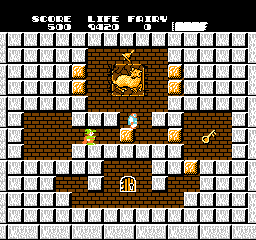
Solomon’s Key is a challenging puzzle-platformer originally developed by Tecmo, brought to the NES in 1987. Playing as Dana the wizard, your task is to retrieve the legendary magic formula hidden within the Constellation Sign. The game demands both quick reflexes and careful planning, as you navigate single-screen rooms filled with demons while managing a strict time limit.

How to Play

Your objective in each room is to find the key and reach the exit door before the timer runs out. Dana’s primary ability is using his magic wand to create and destroy orange stone blocks. You can use these blocks to build staircases, block enemy paths, or trap them. You also occasionally find fireballs to permanently defeat enemies.

  • Movement: Arrow Keys (D-pad)
  • Jump: X (A button)
  • Use Wand (Create/Destroy Block / Shoot Fireball): Z (B button)
  • Start/Pause: Enter (Start)
  • Select: Shift (Select)

Tips

  • You can destroy blocks that are directly above you by jumping up and hitting them with your head twice. This is essential for navigating tight vertical shafts.
  • Creating a block over a monster spawn point (the sparkling mirrors) will temporarily prevent enemies from spawning there.
  • Observe enemy patterns. Most demons follow strict movement rules; for instance, some only walk on blocks and fall off edges, while others hover or turn around at walls.
Player Comments & Discussion: 0 Comments

Leave a Comment / Review:

No comments yet. Be the first gamer to sign the guestbook!