๐ŸŽฎ Play Star Trek – Starfleet Academy (Europe) Online (SNES)

๐ŸŽฒ NEXT RANDOM GAME
Star Trek – Starfleet Academy (Europe) cover art
SAVE SLOTS:

๐Ÿ•น๏ธ GAME CONTROLS

Action / ButtonKeyboard Key
D-Pad (Up / Down / Left / Right)Arrow Keys
Button AZ or J
Button BX or K
Button X / Turbo AA or U
Button Y / Turbo BS or I
SelectShift
StartEnter

๐Ÿ’ก Tip: You can also connect any USB / Bluetooth Gamepad controller!

Game Rating & Player Reviews: โญ Not rated yet
โ€“
โ˜†โ˜†โ˜†โ˜†โ˜†
Be the first to rate
Rate this game (Click 1 to 5 stars):
โ˜… โ˜… โ˜… โ˜… โ˜…

✏️ Suggest an edit to Star Trek – Starfleet Academy (Europe)

๐Ÿšฉ Report Issue with Star Trek – Starfleet Academy (Europe):

๐ŸŽฎ VISUAL CONTROLLER MAPPING & GAMEPAD DIAGRAM Auto-Detect: Active
L1 / LB R1 / RB SELECT START Y X A B RETRO ARCADE
Gamepad InputRetro FunctionKeyboard Key
D-Pad / AnalogCharacter Movement / Steeringโ–ฒ โ–ผ โ—„ โ–บ
Button A (East)Primary Action / Attack / FireZ / K
Button B (South)Secondary / Jump / CancelX / J
Button X / YSpecial / Turbo / Extra FireA / S
SelectInsert Coin / Select OptionRight Shift
StartGame Start / Pause GameEnter
Game info: ๐Ÿ‘๏ธ 118 plays
Star Trek – Starfleet Academy (Europe)
box cover
Game title:Star Trek – Starfleet Academy (Europe)
Platform:SNES
Emulator Core:SNES
Game Manual: ๐Ÿ“– Official Manual (Built-in)
Share Game:
License:Freeware / Abandonware
Available online emulators for Star Trek – Starfleet Academy (Europe):

Different online emulators are available for Star Trek – Starfleet Academy (Europe). Select an emulator core below for optimal performance:

Emulator Core EngineTechnologyMultiplayerGamepadTouchAdsAction / Switch
EmulatorJS (Default WebAssembly) WebAssembly / JSYESYES YESNO โ–ถ ACTIVE
SNES / Super Famicom (Recommended) WebAssembly / LibretroYESYES YESNO PLAY โšก
Game description:

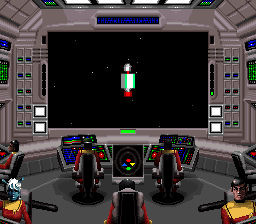
Star Trek: Starfleet Academy โ€“ Starship Bridge Simulator is a 1994 space combat and simulation game developed by Interplay for the Super Nintendo (SNES). You play as a cadet progressing through Starfleet Academy, taking the captain’s chair to command a starship through various tactical missions and encounters. Notably ambitious for a 16-bit console, the game renders its 3D space environments without the use of specialized enhancement chips, bringing classic scenarios like the Kobayashi Maru to the SNES.

As a bridge simulator, mastering your ship’s systems is key. In the browser emulator, the SNES D-pad is mapped to your arrow keys for navigation. The primary action buttons (A, B, X, Y) map to your keyboard’s X, Z, S, and A keys respectively, allowing you to cycle through bridge stations like navigation, tactical, and communications. Press Enter for Start and Shift for Select to access menus.

Combat requires balancing your power systems; diverting power to shields during a heavy attack can save your ship, but remember to allocate energy back to weapons when you need to return fire. Use the communications station to scan unknown vessels before engaging, as not every encounter requires a torpedo.

Player Comments & Discussion: 0 Comments

Leave a Comment / Review:

No comments yet. Be the first gamer to sign the guestbook!