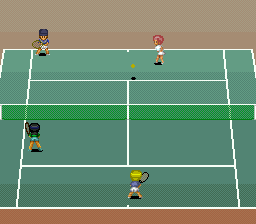
๐ŸŽฎ Play Smash Tennis (Europe) Online (SNES)

๐ŸŽฒ NEXT RANDOM GAME
Smash Tennis (Europe) cover art
SAVE SLOTS:

๐Ÿ•น๏ธ GAME CONTROLS

Action / ButtonKeyboard Key
D-Pad (Up / Down / Left / Right)Arrow Keys
Button AZ or J
Button BX or K
Button X / Turbo AA or U
Button Y / Turbo BS or I
SelectShift
StartEnter

๐Ÿ’ก Tip: You can also connect any USB / Bluetooth Gamepad controller!

Game Rating & Player Reviews: โญ Not rated yet
โ€“
โ˜†โ˜†โ˜†โ˜†โ˜†
Be the first to rate
Rate this game (Click 1 to 5 stars):
โ˜… โ˜… โ˜… โ˜… โ˜…

✏️ Suggest an edit to Smash Tennis (Europe)

๐Ÿšฉ Report Issue with Smash Tennis (Europe):

๐ŸŽฎ VISUAL CONTROLLER MAPPING & GAMEPAD DIAGRAM Auto-Detect: Active
L1 / LB R1 / RB SELECT START Y X A B RETRO ARCADE
Gamepad InputRetro FunctionKeyboard Key
D-Pad / AnalogCharacter Movement / Steeringโ–ฒ โ–ผ โ—„ โ–บ
Button A (East)Primary Action / Attack / FireZ / K
Button B (South)Secondary / Jump / CancelX / J
Button X / YSpecial / Turbo / Extra FireA / S
SelectInsert Coin / Select OptionRight Shift
StartGame Start / Pause GameEnter
Game info: ๐Ÿ‘๏ธ 108 plays
Smash Tennis (Europe)
box cover
Game title:Smash Tennis (Europe)
Platform:SNES
Emulator Core:SNES
Game Manual: ๐Ÿ“– Official Manual (Built-in)
Share Game:
License:Freeware / Abandonware
Available online emulators for Smash Tennis (Europe):

Different online emulators are available for Smash Tennis (Europe). Select an emulator core below for optimal performance:

Emulator Core EngineTechnologyMultiplayerGamepadTouchAdsAction / Switch
EmulatorJS (Default WebAssembly) WebAssembly / JSYESYES YESNO โ–ถ ACTIVE
SNES / Super Famicom (Recommended) WebAssembly / LibretroYESYES YESNO PLAY โšก
Game description:

Originally released in Japan as Super Family Tennis, Namco’s 1993 SNES sports classic Smash Tennis bypasses simulation in favour of fast, fluid rallies. It offers a colourful roster of characters with distinct stats alongside imaginative courts that range from standard clay and grass to a mountaintop resort or a sunny beach.

How to play

To win a match, outmanoeuvre your opponent with well-timed shots, volleys, and smashes. By default in the browser emulator, use the Arrow keys to move your player and aim. The SNES face buttons are mapped to your keyboard’s Z, X, A, and S keys, which handle different stroke types like flat shots, topspin, and lobs. Press Enter for Start and Shift for Select.

Tips

  • Watch the character stats: Each player has a different balance of speed, power, and stamina. A slower, powerful character plays very differently from a speedy baseline defender.
  • Positioning is key: Move into the path of the ball early so you can dictate the angle of your return, rather than lunging at the last second.
Player Comments & Discussion: 0 Comments

Leave a Comment / Review:

No comments yet. Be the first gamer to sign the guestbook!