๐ŸŽฎ Play Final Fantasy Chronicles – Final Fantasy IV Online (PlayStation)

๐ŸŽฒ NEXT RANDOM GAME
Final Fantasy Chronicles – Final Fantasy IV cover art
SAVE SLOTS:

๐Ÿ•น๏ธ GAME CONTROLS

Action / ButtonKeyboard Key
D-Pad (Up / Down / Left / Right)Arrow Keys
Button AZ or J
Button BX or K
Button X / Turbo AA or U
Button Y / Turbo BS or I
SelectShift
StartEnter

๐Ÿ’ก Tip: You can also connect any USB / Bluetooth Gamepad controller!

Game Rating & Player Reviews: โญ Not rated yet
โ€“
โ˜†โ˜†โ˜†โ˜†โ˜†
Be the first to rate
Rate this game (Click 1 to 5 stars):
โ˜… โ˜… โ˜… โ˜… โ˜…

✏️ Suggest an edit to Final Fantasy Chronicles – Final Fantasy IV

๐Ÿšฉ Report Issue with Final Fantasy Chronicles – Final Fantasy IV:

๐ŸŽฎ VISUAL CONTROLLER MAPPING & GAMEPAD DIAGRAM Auto-Detect: Active
L1 / LB R1 / RB SELECT START Y X A B RETRO ARCADE
Gamepad InputRetro FunctionKeyboard Key
D-Pad / AnalogCharacter Movement / Steeringโ–ฒ โ–ผ โ—„ โ–บ
Button A (East)Primary Action / Attack / FireZ / K
Button B (South)Secondary / Jump / CancelX / J
Button X / YSpecial / Turbo / Extra FireA / S
SelectInsert Coin / Select OptionRight Shift
StartGame Start / Pause GameEnter
Game info: ๐Ÿ‘๏ธ 137 plays
Final Fantasy Chronicles – Final Fantasy IV
box cover
Game title:Final Fantasy Chronicles – Final Fantasy IV
Platform:PlayStation
Emulator Core:PSX
Game Manual: ๐Ÿ“– Official Manual (Built-in)
Share Game:
License:Freeware / Abandonware
Available online emulators for Final Fantasy Chronicles – Final Fantasy IV:

Different online emulators are available for Final Fantasy Chronicles – Final Fantasy IV. Select an emulator core below for optimal performance:

Emulator Core EngineTechnologyMultiplayerGamepadTouchAdsAction / Switch
EmulatorJS (Default WebAssembly) WebAssembly / JSYESYES YESNO โ–ถ ACTIVE
PlayStation (Recommended) WebAssembly / LibretroYESYES YESNO PLAY โšก
Beetle PSX HW WebAssembly / LibretroYESYES YESNO PLAY โšก
Game description:

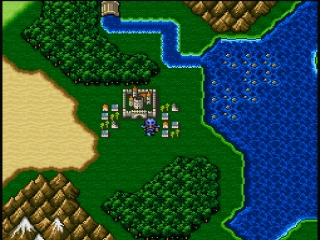
Originally released for the SNES, Final Fantasy IV comes to the PlayStation as part of the Final Fantasy Chronicles collection. Developed by Square and released in 2001, this classic role-playing game introduced the iconic Active Time Battle (ATB) system and tells the epic story of Cecil, a dark knight seeking redemption. The PlayStation release retains the acclaimed 2D gameplay while adding a new CG opening cinematic, an improved translation, and bonus features like a bestiary and artwork gallery.

How to Play

Your objective is to guide Cecil and his allies across the world, exploring towns, braving dungeons, and battling monsters to stop the sorcerer Golbez. Combat uses the Active Time Battle system, where characters and enemies attack based on individual speed meters. For this PlayStation release, use the D-pad to move and navigate menus. Press the Cross button to confirm actions, the Circle button to cancel, and the Triangle button to open your main menu. In your browser, these map to the arrow keys for movement, with Z, X, S, and A acting as the main face buttons.

Tips

  • Keep an eye on your party’s ATB gauges and adjust the battle speed in the options menu if combat feels too fast, as enemies will attack while you are navigating menus.
  • When placing your characters in formation, keep physically weak spellcasters like Rydia and Rosa in the back row to reduce the physical damage they take from enemies.
  • Many bosses have specific elemental weaknesses or shifting vulnerabilities; pay attention to their attack patterns and use the appropriate Black Magic spells to deal heavy damage.
Player Comments & Discussion: 0 Comments

Leave a Comment / Review:

No comments yet. Be the first gamer to sign the guestbook!