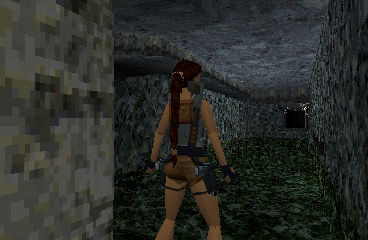
🎮 Play Tomb Raider 2 Online (PlayStation)

🎲 NEXT RANDOM GAME
Tomb Raider 2 cover art
SAVE SLOTS:

đŸ•šī¸ GAME CONTROLS

Action / ButtonKeyboard Key
D-Pad (Up / Down / Left / Right)Arrow Keys
Button AZ or J
Button BX or K
Button X / Turbo AA or U
Button Y / Turbo BS or I
SelectShift
StartEnter

💡 Tip: You can also connect any USB / Bluetooth Gamepad controller!

Game Rating & Player Reviews: ⭐ Not rated yet
–
☆☆☆☆☆
Be the first to rate
Rate this game (Click 1 to 5 stars):
★ ★ ★ ★ ★

✏️ Suggest an edit to Tomb Raider 2

🚩 Report Issue with Tomb Raider 2:

🎮 VISUAL CONTROLLER MAPPING & GAMEPAD DIAGRAM Auto-Detect: Active
L1 / LB R1 / RB SELECT START Y X A B RETRO ARCADE
Gamepad InputRetro FunctionKeyboard Key
D-Pad / AnalogCharacter Movement / Steering▲ â–ŧ ◄ â–ē
Button A (East)Primary Action / Attack / FireZ / K
Button B (South)Secondary / Jump / CancelX / J
Button X / YSpecial / Turbo / Extra FireA / S
SelectInsert Coin / Select OptionRight Shift
StartGame Start / Pause GameEnter
Game info: đŸ‘ī¸ 105 plays
Tomb Raider 2
box cover
Game title:Tomb Raider 2
Platform:PlayStation
Emulator Core:PSX
Game Manual: 📖 Official Manual (Built-in)
Share Game:
License:Freeware / Abandonware
Available online emulators for Tomb Raider 2:

Different online emulators are available for Tomb Raider 2. Select an emulator core below for optimal performance:

Emulator Core EngineTechnologyMultiplayerGamepadTouchAdsAction / Switch
EmulatorJS (Default WebAssembly) WebAssembly / JSYESYES YESNO â–ļ ACTIVE
PlayStation (Recommended) WebAssembly / LibretroYESYES YESNO PLAY ⚡
Beetle PSX HW WebAssembly / LibretroYESYES YESNO PLAY ⚡
Game description:

Tomb Raider 2 is a classic 3D action-adventure game developed by Core Design and released for the PlayStation in 1997. Following the massive success of the original, this sequel brings Lara Croft back for a globe-trotting expedition to find the mythical Dagger of Xian. The game introduces new weapons, vehicle sections, and refined platforming, taking players through diverse environments like Venice, Tibet, and a sunken ocean liner.

How to Play

Your objective is to navigate complex 3D environments, solve environmental puzzles, and survive dangerous combat encounters to recover the Dagger of Xian before a rival cult. Tomb Raider 2 uses classic “tank controls” for movement. In the browser emulator, use the Arrow keys (D-pad) to run, backstep, and turn Lara. Use the action keys (Z, X, A, S) corresponding to the PlayStation face buttons for jumping, drawing weapons, and interacting with the environment. Press Enter (Start) to access the inventory ring and save your game, and use Q, W, E, R for the shoulder buttons to side-step or walk.

Tips

  • Always use the “walk” button when approaching ledges; Lara will never run off an edge while walking, allowing you to safely line up tricky jumps.
  • To perform a maximum distance jump, walk to the very edge of a platform, hop backwards once, then run forward and press jump just before the edge.
  • You can save your game anywhere from the inventory menu. Save often, especially before difficult platforming sections or boss fights.

Player Comments & Discussion: 0 Comments

Leave a Comment / Review:

No comments yet. Be the first gamer to sign the guestbook!

