๐ŸŽฎ Play Yoshi in Sonic 2 Online (Sega Genesis)

๐ŸŽฒ NEXT RANDOM GAME
Yoshi in Sonic 2 cover art
SAVE SLOTS:

๐Ÿ•น๏ธ GAME CONTROLS

Action / ButtonKeyboard Key
D-Pad (Up / Down / Left / Right)Arrow Keys
Button AZ or J
Button BX or K
Button X / Turbo AA or U
Button Y / Turbo BS or I
SelectShift
StartEnter

๐Ÿ’ก Tip: You can also connect any USB / Bluetooth Gamepad controller!

Game Rating & Player Reviews: โญ Not rated yet
โ€“
โ˜†โ˜†โ˜†โ˜†โ˜†
Be the first to rate
Rate this game (Click 1 to 5 stars):
โ˜… โ˜… โ˜… โ˜… โ˜…

✏️ Suggest an edit to Yoshi in Sonic 2

๐Ÿšฉ Report Issue with Yoshi in Sonic 2:

๐ŸŽฎ VISUAL CONTROLLER MAPPING & GAMEPAD DIAGRAM Auto-Detect: Active
L1 / LB R1 / RB SELECT START Y X A B RETRO ARCADE
Gamepad InputRetro FunctionKeyboard Key
D-Pad / AnalogCharacter Movement / Steeringโ–ฒ โ–ผ โ—„ โ–บ
Button A (East)Primary Action / Attack / FireZ / K
Button B (South)Secondary / Jump / CancelX / J
Button X / YSpecial / Turbo / Extra FireA / S
SelectInsert Coin / Select OptionRight Shift
StartGame Start / Pause GameEnter
Game info: ๐Ÿ‘๏ธ 144 plays
Yoshi in Sonic 2
box cover
Game title:Yoshi in Sonic 2
Platform:Sega Genesis
Emulator Core:SEGAMD
Game Manual: ๐Ÿ“– Official Manual (Built-in)
Share Game:
License:Freeware / Abandonware
Available online emulators for Yoshi in Sonic 2:

Different online emulators are available for Yoshi in Sonic 2. Select an emulator core below for optimal performance:

Emulator Core EngineTechnologyMultiplayerGamepadTouchAdsAction / Switch
EmulatorJS (Default WebAssembly) WebAssembly / JSYESYES YESNO โ–ถ ACTIVE
Sega Genesis / Mega Drive (Recommended) WebAssembly / LibretroYESYES YESNO PLAY โšก
PicoDrive WebAssembly / LibretroYESYES YESNO PLAY โšก
Game description:

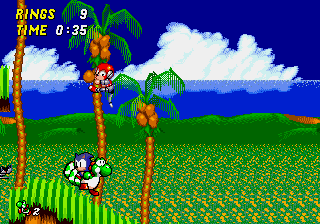
Yoshi in Sonic 2 is a celebrated ROM hack for the Sega Genesis that brings Nintendo’s beloved dinosaur into the world of Sonic the Hedgehog 2. This clever crossover replaces Sonic with Yoshi, completely changing the feel of the classic platformer. Instead of relying on pure speed, players must use Yoshi’s unique physics and abilitiesโ€”like his long tongue and flutter jumpโ€”to navigate the familiar loops and hazards of West Side Island.

How to Play

The goal is to reach the end of each zone and stop Dr. Robotnik, collecting rings along the way to protect yourself from taking damage. For the browser emulator, the default Sega Genesis controls are the Arrow Keys for movement, and Z, X, or C to jump. Pressing the jump button again while in the air allows Yoshi to perform his signature flutter jump, granting extra height and distance. You can also use Yoshi’s tongue to snap up rings and defeat enemies safely from a distance.

Tips

  • Abuse the flutter jump: Yoshi’s flutter jump makes platforming much more forgiving than Sonic’s standard jump. Use it to correct your trajectory in mid-air or bypass difficult platforming sections entirely.
  • Grab rings with your tongue: You can use Yoshi’s tongue to grab loose rings or even pull rings through walls. This is incredibly useful for recovering rings immediately after taking a hit.
  • Boss fights require a new strategy: Since Yoshi doesn’t have the spin attack, you cannot simply roll into Dr. Robotnik’s machines. Use your flutter jump to carefully aim your bounces onto the boss’s weak points.
Player Comments & Discussion: 0 Comments

Leave a Comment / Review:

No comments yet. Be the first gamer to sign the guestbook!