🎮 Play Namco Museum Vol. 2 Online (PlayStation)

🎲 NEXT RANDOM GAME
Namco Museum Vol. 2 cover art
SAVE SLOTS:

đŸ•šī¸ GAME CONTROLS

Action / ButtonKeyboard Key
D-Pad (Up / Down / Left / Right)Arrow Keys
Button AZ or J
Button BX or K
Button X / Turbo AA or U
Button Y / Turbo BS or I
SelectShift
StartEnter

💡 Tip: You can also connect any USB / Bluetooth Gamepad controller!

Game Rating & Player Reviews: ⭐ Not rated yet
–
☆☆☆☆☆
Be the first to rate
Rate this game (Click 1 to 5 stars):
★ ★ ★ ★ ★

✏️ Suggest an edit to Namco Museum Vol. 2

🚩 Report Issue with Namco Museum Vol. 2:

🎮 VISUAL CONTROLLER MAPPING & GAMEPAD DIAGRAM Auto-Detect: Active
L1 / LB R1 / RB SELECT START Y X A B RETRO ARCADE
Gamepad InputRetro FunctionKeyboard Key
D-Pad / AnalogCharacter Movement / Steering▲ â–ŧ ◄ â–ē
Button A (East)Primary Action / Attack / FireZ / K
Button B (South)Secondary / Jump / CancelX / J
Button X / YSpecial / Turbo / Extra FireA / S
SelectInsert Coin / Select OptionRight Shift
StartGame Start / Pause GameEnter
Game info: đŸ‘ī¸ 105 plays
Namco Museum Vol. 2
box cover
Game title:Namco Museum Vol. 2
Platform:PlayStation
Emulator Core:PSX
Game Manual: 📖 Official Manual (Built-in)
Share Game:
License:Freeware / Abandonware
Available online emulators for Namco Museum Vol. 2:

Different online emulators are available for Namco Museum Vol. 2. Select an emulator core below for optimal performance:

Emulator Core EngineTechnologyMultiplayerGamepadTouchAdsAction / Switch
EmulatorJS (Default WebAssembly) WebAssembly / JSYESYES YESNO â–ļ ACTIVE
PlayStation (Recommended) WebAssembly / LibretroYESYES YESNO PLAY ⚡
Beetle PSX HW WebAssembly / LibretroYESYES YESNO PLAY ⚡
Game description:

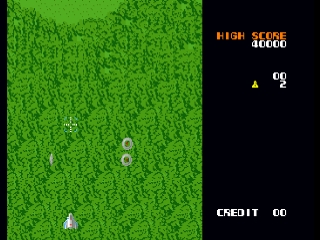
Namco Museum Vol. 2 brings another essential collection of vintage Namco arcade hits to the PlayStation. Released in 1996, this compilation features six classic titles from the early days of gaming. Players can jump into the maze-chasing action of Super Pac-Man, pilot a ship in the vertical shooter Xevious, and bounce through the cat-and-mouse platformer Mappy. The collection also includes the intense sci-fi shooter Gaplus, the arena combat of Grobda, and the action-RPG mechanics of Dragon Buster, complete with a virtual museum to explore.

How to Play
Select your game of choice from the 3D museum lobby. Each title features its original arcade gameplay and objectives. Use the Arrow Keys to move your character or ship. Action buttons are mapped to Z (Cross), X (Circle), A (Square), and S (Triangle). Use Enter (Start) to pause or begin a game, and Shift (Select) to insert virtual coins into the arcade machines.

Tips

  • In Mappy, enemies cannot harm you while bouncing on a trampoline, but bouncing on the same trampoline four times without landing will break it.
  • When playing Xevious, pay close attention to your ground-targeting reticle; use your bombs strategically to take out bases before they fire.
  • In Super Pac-Man, grab the Super Pellets to grow massive and gain the ability to smash through doors and speed past ghosts without eating keys.

Player Comments & Discussion: 0 Comments

Leave a Comment / Review:

No comments yet. Be the first gamer to sign the guestbook!

