🎮 Play Monaco Grand Prix (USA) Online (Nintendo 64)

🎲 NEXT RANDOM GAME
Monaco Grand Prix (USA) cover art
SAVE SLOTS:

đŸ•šī¸ GAME CONTROLS

Action / ButtonKeyboard Key
D-Pad (Up / Down / Left / Right)Arrow Keys
Button AZ or J
Button BX or K
Button X / Turbo AA or U
Button Y / Turbo BS or I
SelectShift
StartEnter

💡 Tip: You can also connect any USB / Bluetooth Gamepad controller!

Game Rating & Player Reviews: ⭐ Not rated yet
–
☆☆☆☆☆
Be the first to rate
Rate this game (Click 1 to 5 stars):
★ ★ ★ ★ ★

✏️ Suggest an edit to Monaco Grand Prix (USA)

🚩 Report Issue with Monaco Grand Prix (USA):

🎮 VISUAL CONTROLLER MAPPING & GAMEPAD DIAGRAM Auto-Detect: Active
L1 / LB R1 / RB SELECT START Y X A B RETRO ARCADE
Gamepad InputRetro FunctionKeyboard Key
D-Pad / AnalogCharacter Movement / Steering▲ â–ŧ ◄ â–ē
Button A (East)Primary Action / Attack / FireZ / K
Button B (South)Secondary / Jump / CancelX / J
Button X / YSpecial / Turbo / Extra FireA / S
SelectInsert Coin / Select OptionRight Shift
StartGame Start / Pause GameEnter
Game info: đŸ‘ī¸ 107 plays
Monaco Grand Prix (USA)
box cover
Game title:Monaco Grand Prix (USA)
Platform:Nintendo 64
Author (released): Unknown (1999)
Emulator Core:N64
Game Manual: 📖 Official Manual (Built-in)
Share Game:
License:Freeware / Abandonware
Available online emulators for Monaco Grand Prix (USA):

Different online emulators are available for Monaco Grand Prix (USA). Select an emulator core below for optimal performance:

Emulator Core EngineTechnologyMultiplayerGamepadTouchAdsAction / Switch
EmulatorJS (Default WebAssembly) WebAssembly / JSYESYES YESNO â–ļ ACTIVE
Nintendo 64 (Recommended) WebAssembly / LibretroYESYES YESNO PLAY ⚡
ParaLLEl N64 WebAssembly / LibretroYESYES YESNO PLAY ⚡
Game description:

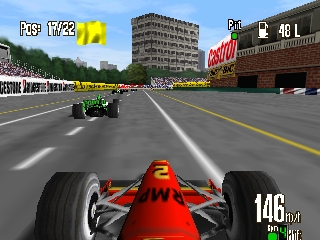
Monaco Grand Prix is a dedicated Formula 1 racing simulation released for the Nintendo 64 in 1999 by Ubisoft. Rather than relying on an official FIA license, the game focuses entirely on capturing the authentic feel of open-wheel racing, offering comprehensive tuning options and challenging handling physics. It stands out on the console for its smooth framerate, demanding track designs, and deep career progression that requires true driving discipline.

How to Play

Compete in a full championship season, time attacks, or individual races by mastering the sharp handling of your F1 car. Steer using the analog stick (mapped to your arrow keys), with A and B (Z and X on your keyboard) controlling acceleration and braking. Press Start (Enter) to pause or access the tuning menu.

Tips

  • Do not keep the accelerator fully pressed through corners; learning to feather the throttle and brake smoothly is essential to avoid spinning out.
  • Spend time in the tuning menu before a race; adjusting your downforce and gear ratios for each specific track drastically improves your lap times.
  • Pay close attention to tire wear and fuel load during longer championship races, as planning a timely pit stop is often the key to winning.
Player Comments & Discussion: 0 Comments

Leave a Comment / Review:

No comments yet. Be the first gamer to sign the guestbook!