🎮 Play Cosmic Spacehead (Europe) (En,Fr,De,Es) (Unl) Online (NES)

🎲 NEXT RANDOM GAME
Cosmic Spacehead (Europe) (En,Fr,De,Es) (Unl) cover art
SAVE SLOTS:

đŸ•šī¸ GAME CONTROLS

Action / ButtonKeyboard Key
D-Pad (Up / Down / Left / Right)Arrow Keys
Button AZ or J
Button BX or K
Button X / Turbo AA or U
Button Y / Turbo BS or I
SelectShift
StartEnter

💡 Tip: You can also connect any USB / Bluetooth Gamepad controller!

Game Rating & Player Reviews: ⭐ Not rated yet
–
☆☆☆☆☆
Be the first to rate
Rate this game (Click 1 to 5 stars):
★ ★ ★ ★ ★

✏️ Suggest an edit to Cosmic Spacehead (Europe) (En,Fr,De,Es) (Unl)

🚩 Report Issue with Cosmic Spacehead (Europe) (En,Fr,De,Es) (Unl):

🎮 VISUAL CONTROLLER MAPPING & GAMEPAD DIAGRAM Auto-Detect: Active
L1 / LB R1 / RB SELECT START Y X A B RETRO ARCADE
Gamepad InputRetro FunctionKeyboard Key
D-Pad / AnalogCharacter Movement / Steering▲ â–ŧ ◄ â–ē
Button A (East)Primary Action / Attack / FireZ / K
Button B (South)Secondary / Jump / CancelX / J
Button X / YSpecial / Turbo / Extra FireA / S
SelectInsert Coin / Select OptionRight Shift
StartGame Start / Pause GameEnter
Game info: đŸ‘ī¸ 88 plays
Cosmic Spacehead (Europe) (En,Fr,De,Es) (Unl)
box cover
Game title:Cosmic Spacehead (Europe) (En,Fr,De,Es) (Unl)
Platform:NES
Emulator Core:NES
Game Manual: 📖 Official Manual (Built-in)
Share Game:
License:Freeware / Abandonware
Available online emulators for Cosmic Spacehead (Europe) (En,Fr,De,Es) (Unl):

Different online emulators are available for Cosmic Spacehead (Europe) (En,Fr,De,Es) (Unl). Select an emulator core below for optimal performance:

Emulator Core EngineTechnologyMultiplayerGamepadTouchAdsAction / Switch
EmulatorJS (Default WebAssembly) WebAssembly / JSYESYES YESNO â–ļ ACTIVE
NES / Famicom (Recommended) WebAssembly / LibretroYESYES YESNO PLAY ⚡
Nestopia UE (Accurate) WebAssembly / LibretroYESYES YESNO PLAY ⚡
Game description:

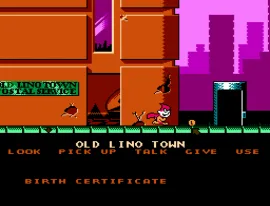
Released by Codemasters in 1993 for the NES, Cosmic Spacehead is a distinct hybrid that blends classic point-and-click adventure puzzles with traditional side-scrolling platforming. Players take on the role of Linus, an alien who must navigate his home world of Linoleum to find a camera and a car so he can return to a mythical planet called Earth and prove his discovery. The game shifts between exploring towns to trade items and conversing with quirky characters, and jumping through treacherous platforming stages to travel between locations.

How to play

The objective is to guide Linus off his home planet by solving inventory puzzles and surviving action stages. During the adventure segments, you will talk to characters and use items to progress. In the platforming segments, you must dodge enemies and navigate tricky jumps. The NES controls map to your keyboard: use the arrow keys (D-pad) to move or point the cursor, Z (A button) to jump or confirm actions, X (B button) to cancel or run, and Enter (Start) to begin or pause.

Tips

  • Patience in platforming: Linus’s jump is somewhat floaty and hazards are lethal. Take your time in the side-scrolling areas, as rushing will quickly deplete your lives.
  • Examine everything: In the adventure sections, click on every object and talk to every character multiple times. Giving the right item to the right person is mandatory for progression, and clues are often hidden in dialogue.
Player Comments & Discussion: 0 Comments

Leave a Comment / Review:

No comments yet. Be the first gamer to sign the guestbook!