๐ŸŽฎ Play Chip to Dale no Daisakusen (Japan) Online (NES)

๐ŸŽฒ NEXT RANDOM GAME
Chip to Dale no Daisakusen (Japan) cover art
SAVE SLOTS:

๐Ÿ•น๏ธ GAME CONTROLS

Action / ButtonKeyboard Key
D-Pad (Up / Down / Left / Right)Arrow Keys
Button AZ or J
Button BX or K
Button X / Turbo AA or U
Button Y / Turbo BS or I
SelectShift
StartEnter

๐Ÿ’ก Tip: You can also connect any USB / Bluetooth Gamepad controller!

Game Rating & Player Reviews: โญ Not rated yet
โ€“
โ˜†โ˜†โ˜†โ˜†โ˜†
Be the first to rate
Rate this game (Click 1 to 5 stars):
โ˜… โ˜… โ˜… โ˜… โ˜…

✏️ Suggest an edit to Chip to Dale no Daisakusen (Japan)

๐Ÿšฉ Report Issue with Chip to Dale no Daisakusen (Japan):

๐ŸŽฎ VISUAL CONTROLLER MAPPING & GAMEPAD DIAGRAM Auto-Detect: Active
L1 / LB R1 / RB SELECT START Y X A B RETRO ARCADE
Gamepad InputRetro FunctionKeyboard Key
D-Pad / AnalogCharacter Movement / Steeringโ–ฒ โ–ผ โ—„ โ–บ
Button A (East)Primary Action / Attack / FireZ / K
Button B (South)Secondary / Jump / CancelX / J
Button X / YSpecial / Turbo / Extra FireA / S
SelectInsert Coin / Select OptionRight Shift
StartGame Start / Pause GameEnter
Game info: ๐Ÿ‘๏ธ 126 plays
Chip to Dale no Daisakusen (Japan)
box cover
Game title:Chip to Dale no Daisakusen (Japan)
Platform:NES
Author (released): Unknown (1990)
Emulator Core:NES
Game Manual: ๐Ÿ“– Official Manual (Built-in)
Share Game:
License:Freeware / Abandonware
Available online emulators for Chip to Dale no Daisakusen (Japan):

Different online emulators are available for Chip to Dale no Daisakusen (Japan). Select an emulator core below for optimal performance:

Emulator Core EngineTechnologyMultiplayerGamepadTouchAdsAction / Switch
EmulatorJS (Default WebAssembly) WebAssembly / JSYESYES YESNO โ–ถ ACTIVE
NES / Famicom (Recommended) WebAssembly / LibretroYESYES YESNO PLAY โšก
Nestopia UE (Accurate) WebAssembly / LibretroYESYES YESNO PLAY โšก
Game description:

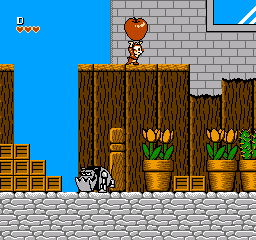
Chip to Dale no Daisakusen (released internationally as Chip ‘n Dale Rescue Rangers) is a 1990 cooperative platformer developed by Capcom for the NES. Players guide the titular chipmunk detectives through oversized, household environments, navigating tricky platforming challenges to stop Fat Cat and his mechanical minions.

How to Play

Unlike traditional platformers where jumping defeats enemies, your primary offense is picking up objects like crates and apples to hurl at foes. In this browser emulator, the NES controls are mapped to your keyboard: use the arrow keys to move, Z to jump (A button), X to pick up and throw items (B button), and Enter to start the game.

Tips

  • You can duck inside an empty crate by holding down; enemies that walk into the crate will be instantly defeated.
  • When carrying a heavy object like a shiny apple, your jump height and movement speed are significantly reduced.
  • If playing cooperatively, you can actually pick up and throw the other player. This is useful for tossing them up to out-of-reach platforms, though you must be careful not to throw them into danger.
Player Comments & Discussion: 0 Comments

Leave a Comment / Review:

No comments yet. Be the first gamer to sign the guestbook!