๐ŸŽฎ Play Mitsume ga Tooru (Japan) Online (NES)

๐ŸŽฒ NEXT RANDOM GAME
Mitsume ga Tooru (Japan) cover art
SAVE SLOTS:

๐Ÿ•น๏ธ GAME CONTROLS

Action / ButtonKeyboard Key
D-Pad (Up / Down / Left / Right)Arrow Keys
Button AZ or J
Button BX or K
Button X / Turbo AA or U
Button Y / Turbo BS or I
SelectShift
StartEnter

๐Ÿ’ก Tip: You can also connect any USB / Bluetooth Gamepad controller!

Game Rating & Player Reviews: โญ Not rated yet
โ€“
โ˜†โ˜†โ˜†โ˜†โ˜†
Be the first to rate
Rate this game (Click 1 to 5 stars):
โ˜… โ˜… โ˜… โ˜… โ˜…

✏️ Suggest an edit to Mitsume ga Tooru (Japan)

๐Ÿšฉ Report Issue with Mitsume ga Tooru (Japan):

๐ŸŽฎ VISUAL CONTROLLER MAPPING & GAMEPAD DIAGRAM Auto-Detect: Active
L1 / LB R1 / RB SELECT START Y X A B RETRO ARCADE
Gamepad InputRetro FunctionKeyboard Key
D-Pad / AnalogCharacter Movement / Steeringโ–ฒ โ–ผ โ—„ โ–บ
Button A (East)Primary Action / Attack / FireZ / K
Button B (South)Secondary / Jump / CancelX / J
Button X / YSpecial / Turbo / Extra FireA / S
SelectInsert Coin / Select OptionRight Shift
StartGame Start / Pause GameEnter
Game info: ๐Ÿ‘๏ธ 145 plays
Mitsume ga Tooru (Japan)
box cover
Game title:Mitsume ga Tooru (Japan)
Platform:NES
Author (released): Unknown (1992)
Emulator Core:NES
Game Manual: ๐Ÿ“– Official Manual (Built-in)
Share Game:
License:Freeware / Abandonware
Available online emulators for Mitsume ga Tooru (Japan):

Different online emulators are available for Mitsume ga Tooru (Japan). Select an emulator core below for optimal performance:

Emulator Core EngineTechnologyMultiplayerGamepadTouchAdsAction / Switch
EmulatorJS (Default WebAssembly) WebAssembly / JSYESYES YESNO โ–ถ ACTIVE
NES / Famicom (Recommended) WebAssembly / LibretroYESYES YESNO PLAY โšก
Nestopia UE (Accurate) WebAssembly / LibretroYESYES YESNO PLAY โšก
Game description:

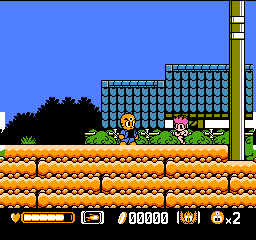
Mitsume ga Tooru, based on Osamu Tezuka’s classic manga The Three-Eyed One, is an acclaimed action-platformer developed by Natsume for the Famicom (NES) and released exclusively in Japan in 1992. You play as Hosuke Sharaku, navigating diverse levels filled with enemies and tricky jumps. The game stands out for its tight controls, excellent soundtrack, and unique mechanics like the Red Condor spear, which can be thrown as a weapon or used as a makeshift springboard to reach secret areas.

How to play

Your goal is to reach the end of each stage, defeat the boss, and rescue your friend Wato. Collect the golden coins dropped by enemiesโ€”shooting a coin repeatedly makes it grow larger, increasing its value! You can spend these coins at shops between sections to upgrade your weapon or buy health items.

Controls:

  • Move: Arrow Keys (D-pad)
  • Jump: Z (A Button)
  • Shoot: X (B Button)
  • Summon/Throw Spear: Hold and release X
  • Start/Pause: Enter

Tips

  • When an enemy drops a coin, shoot it several times to increase its size and value before picking it up. Be careful not to shoot it too many times, or it will disappear!
  • Master using the Red Condor spear as a platform. Throw it into a wall, jump on it, and it will give you a boost to reach high ledges and hidden shops.
  • Buy the “Wave” weapon early on; its wide spread makes dealing with crowds of enemies much easier.
Player Comments & Discussion: 0 Comments

Leave a Comment / Review:

No comments yet. Be the first gamer to sign the guestbook!