๐ŸŽฎ Play Tesserae (USA) Online (Game Boy)

๐ŸŽฒ NEXT RANDOM GAME
Tesserae (USA) cover art
SAVE SLOTS:

๐Ÿ•น๏ธ GAME CONTROLS

Action / ButtonKeyboard Key
D-Pad (Up / Down / Left / Right)Arrow Keys
Button AZ or J
Button BX or K
Button X / Turbo AA or U
Button Y / Turbo BS or I
SelectShift
StartEnter

๐Ÿ’ก Tip: You can also connect any USB / Bluetooth Gamepad controller!

Game Rating & Player Reviews: โญ Not rated yet
โ€“
โ˜†โ˜†โ˜†โ˜†โ˜†
Be the first to rate
Rate this game (Click 1 to 5 stars):
โ˜… โ˜… โ˜… โ˜… โ˜…

✏️ Suggest an edit to Tesserae (USA)

๐Ÿšฉ Report Issue with Tesserae (USA):

๐ŸŽฎ VISUAL CONTROLLER MAPPING & GAMEPAD DIAGRAM Auto-Detect: Active
L1 / LB R1 / RB SELECT START Y X A B RETRO ARCADE
Gamepad InputRetro FunctionKeyboard Key
D-Pad / AnalogCharacter Movement / Steeringโ–ฒ โ–ผ โ—„ โ–บ
Button A (East)Primary Action / Attack / FireZ / K
Button B (South)Secondary / Jump / CancelX / J
Button X / YSpecial / Turbo / Extra FireA / S
SelectInsert Coin / Select OptionRight Shift
StartGame Start / Pause GameEnter
Game info: ๐Ÿ‘๏ธ 98 plays
Tesserae (USA)
box cover
Game title:Tesserae (USA)
Platform:Game Boy
Emulator Core:GB
Game Manual: ๐Ÿ“– Official Manual (Built-in)
Share Game:
License:Freeware / Abandonware
Available online emulators for Tesserae (USA):

Different online emulators are available for Tesserae (USA). Select an emulator core below for optimal performance:

Emulator Core EngineTechnologyMultiplayerGamepadTouchAdsAction / Switch
EmulatorJS (Default WebAssembly) WebAssembly / JSYESYES YESNO โ–ถ ACTIVE
Game Boy / Color (Recommended) WebAssembly / LibretroYESYES YESNO PLAY โšก
Game description:

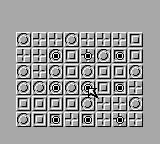
Tesserae is a relaxing but mentally demanding puzzle game for the Game Boy. Originally popularised on early home computers, the objective is to clear a grid of mosaic tiles by jumping them over one another. Because the Game Boy has a monochrome screen, the different tile typesโ€”which combine and reduce when you jump over themโ€”are represented by distinct patterns and shades. You must plan your moves carefully to avoid leaving any stranded tiles behind.

How to play

Your goal is to clear as many tiles from the board as possible, ideally leaving only a single tile. You remove tiles by jumping an adjacent tile over another one, provided there is an empty space to land in. The tiles are structured by complexity; jumping a simpler tile over a complex one reduces it, while jumping matching tiles might clear them entirely.

Controls:

  • Arrow Keys: Move the cursor around the grid
  • Z / X: Select a tile and choose where to jump
  • Enter: Pause or access the in-game menu

Tips

  • Work from the edges: Try to avoid isolating tiles at the corners of the board, as they become impossible to clear without nearby tiles to jump with.
  • Plan ahead: Since jumping changes the destination tile’s pattern rather than just removing it, think two or three moves in advance so you don’t run out of valid jumps.
Player Comments & Discussion: 0 Comments

Leave a Comment / Review:

No comments yet. Be the first gamer to sign the guestbook!