🎮 Play Shadow of the Beast (USA, Europe) Online (Sega Genesis)

🎲 NEXT RANDOM GAME
Shadow of the Beast (USA, Europe) cover art
SAVE SLOTS:

đŸ•šī¸ GAME CONTROLS

Action / ButtonKeyboard Key
D-Pad (Up / Down / Left / Right)Arrow Keys
Button AZ or J
Button BX or K
Button X / Turbo AA or U
Button Y / Turbo BS or I
SelectShift
StartEnter

💡 Tip: You can also connect any USB / Bluetooth Gamepad controller!

Game Rating & Player Reviews: ⭐ Not rated yet
–
☆☆☆☆☆
Be the first to rate
Rate this game (Click 1 to 5 stars):
★ ★ ★ ★ ★

✏️ Suggest an edit to Shadow of the Beast (USA, Europe)

🚩 Report Issue with Shadow of the Beast (USA, Europe):

🎮 VISUAL CONTROLLER MAPPING & GAMEPAD DIAGRAM Auto-Detect: Active
L1 / LB R1 / RB SELECT START Y X A B RETRO ARCADE
Gamepad InputRetro FunctionKeyboard Key
D-Pad / AnalogCharacter Movement / Steering▲ â–ŧ ◄ â–ē
Button A (East)Primary Action / Attack / FireZ / K
Button B (South)Secondary / Jump / CancelX / J
Button X / YSpecial / Turbo / Extra FireA / S
SelectInsert Coin / Select OptionRight Shift
StartGame Start / Pause GameEnter
Game info: đŸ‘ī¸ 94 plays
Shadow of the Beast (USA, Europe)
box cover
Game title:Shadow of the Beast (USA, Europe)
Platform:Sega Genesis
Emulator Core:SEGAMD
Game Manual: 📖 Official Manual (Built-in)
Share Game:
License:Freeware / Abandonware
Available online emulators for Shadow of the Beast (USA, Europe):

Different online emulators are available for Shadow of the Beast (USA, Europe). Select an emulator core below for optimal performance:

Emulator Core EngineTechnologyMultiplayerGamepadTouchAdsAction / Switch
EmulatorJS (Default WebAssembly) WebAssembly / JSYESYES YESNO PLAY ⚡
Sega Genesis / Mega Drive (Recommended) WebAssembly / LibretroYESYES YESNO PLAY ⚡
PicoDrive WebAssembly / LibretroYESYES YESNO â–ļ ACTIVE
Game description:

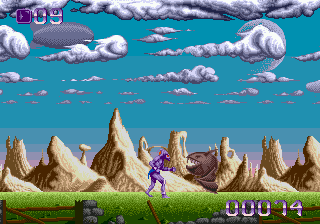
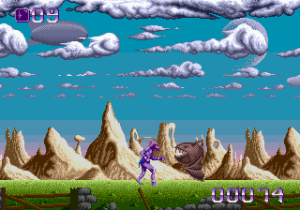
Shadow of the Beast is a legendary action-platformer originally created by Reflections Interactive for the Amiga and ported to the Sega Genesis in 1991. Famous for its dark fantasy atmosphere, stunning parallax scrolling, and incredibly high difficulty, the game puts you in control of Aarbron. Transformed into a monstrous warrior by the beast lord Maletoth, Aarbron regains his human memories and sets out on a brutal quest for revenge across an unforgiving alien landscape.

How to Play

Navigate the deadly environments of Karamoon, punching and kicking through waves of bizarre enemies while avoiding traps. The Genesis version uses the standard controller: use the D-Pad to move and crouch, A or C to attack, and B to jump. In the browser emulator, these map to the arrow keys, Z / C for attacks, and X for jumping.

Tips

  • Memorize enemy patterns: The game is notorious for enemies that spawn rapidly and move quickly. Survival requires memorizing where enemies appear.
  • Pace your attacks: Mashing the attack button can leave you vulnerable. Time your punches to hit enemies exactly as they enter your reach.
  • Explore carefully: Some areas contain vital health potions and keys hidden in the environment or dropped by specific foes.

Player Comments & Discussion: 0 Comments

Leave a Comment / Review:

No comments yet. Be the first gamer to sign the guestbook!