๐ŸŽฎ Play Konami S Ping Pong Online (Arcade)

๐ŸŽฒ NEXT RANDOM GAME
Konami S Ping Pong cover art
SAVE SLOTS:

๐Ÿ•น๏ธ GAME CONTROLS

Action / ButtonKeyboard Key
D-Pad (Up / Down / Left / Right)Arrow Keys
Button AZ or J
Button BX or K
Button X / Turbo AA or U
Button Y / Turbo BS or I
SelectShift
StartEnter

๐Ÿ’ก Tip: You can also connect any USB / Bluetooth Gamepad controller!

Game Rating & Player Reviews: โญ Not rated yet
โ€“
โ˜†โ˜†โ˜†โ˜†โ˜†
Be the first to rate
Rate this game (Click 1 to 5 stars):
โ˜… โ˜… โ˜… โ˜… โ˜…

✏️ Suggest an edit to Konami S Ping Pong

๐Ÿšฉ Report Issue with Konami S Ping Pong:

๐ŸŽฎ VISUAL CONTROLLER MAPPING & GAMEPAD DIAGRAM Auto-Detect: Active
L1 / LB R1 / RB SELECT START Y X A B RETRO ARCADE
Gamepad InputRetro FunctionKeyboard Key
D-Pad / AnalogCharacter Movement / Steeringโ–ฒ โ–ผ โ—„ โ–บ
Button A (East)Primary Action / Attack / FireZ / K
Button B (South)Secondary / Jump / CancelX / J
Button X / YSpecial / Turbo / Extra FireA / S
SelectInsert Coin / Select OptionRight Shift
StartGame Start / Pause GameEnter
Game info: ๐Ÿ‘๏ธ 141 plays
Konami S Ping Pong
box cover
Game title:Konami S Ping Pong
Platform:Arcade
Author (released): Unknown (1985)
Emulator Core:MAME2003_PLUS
Game Manual: ๐Ÿ“– Official Manual (Built-in)
Share Game:
License:Freeware / Abandonware
Available online emulators for Konami S Ping Pong:

Different online emulators are available for Konami S Ping Pong. Select an emulator core below for optimal performance:

Emulator Core EngineTechnologyMultiplayerGamepadTouchAdsAction / Switch
EmulatorJS (Default WebAssembly) WebAssembly / JSYESYES YESNO โ–ถ ACTIVE
Arcade (Recommended) WebAssembly / LibretroYESYES YESNO PLAY โšก
MAME 2003 Plus WebAssembly / LibretroYESYES YESNO PLAY โšก
FB Alpha 2012 (CPS-1) WebAssembly / LibretroYESYES YESNO PLAY โšก
FB Alpha 2012 (CPS-2) WebAssembly / LibretroYESYES YESNO PLAY โšก
Game description:

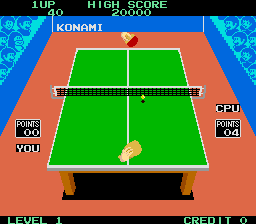
Released in 1985, Konami’s Ping Pong is a classic arcade table tennis simulation that strips away unnecessary details to focus purely on the fast-paced rhythm of the sport. Instead of a full character sprite, you control a paddle from a clean isometric perspective. The game automatically moves your hand to follow the ball, leaving you to focus entirely on shot timing, swing types, and outmaneuvering your opponent.

How to Play

Because horizontal movement is handled for you, success relies on reading the ball’s trajectory and choosing the right shot.

  • Insert Coin / Start: Shift / Enter
  • Swing: Press the Left Arrow (Drive) or Right Arrow (Cut) to time your swing as the ball approaches.
  • Stance: Hold Z to switch between your forehand and backhand stance.
  • Serve / Smash: Press X to toss the ball for a serve, or combine it with a swing to perform a smash during play.

Tips

  • Switch stances early: If the ball is hit toward the edges of the table and you try to return it without switching to the correct stance, you will likely hit it wide.
  • Watch the shadow: Pay attention to the ball’s shadow on the table to accurately gauge its height and speed, making it much easier to time your swings.
Player Comments & Discussion: 0 Comments

Leave a Comment / Review:

No comments yet. Be the first gamer to sign the guestbook!