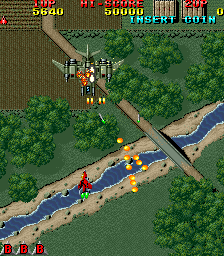
🎮 Play Raiden Set 1 Online (Arcade)

🎲 NEXT RANDOM GAME
Raiden Set 1 cover art
SAVE SLOTS:

đŸ•šī¸ GAME CONTROLS

Action / ButtonKeyboard Key
D-Pad (Up / Down / Left / Right)Arrow Keys
Button AZ or J
Button BX or K
Button X / Turbo AA or U
Button Y / Turbo BS or I
SelectShift
StartEnter

💡 Tip: You can also connect any USB / Bluetooth Gamepad controller!

Game Rating & Player Reviews: ⭐ Not rated yet
–
☆☆☆☆☆
Be the first to rate
Rate this game (Click 1 to 5 stars):
★ ★ ★ ★ ★

✏️ Suggest an edit to Raiden Set 1

🚩 Report Issue with Raiden Set 1:

🎮 VISUAL CONTROLLER MAPPING & GAMEPAD DIAGRAM Auto-Detect: Active
L1 / LB R1 / RB SELECT START Y X A B RETRO ARCADE
Gamepad InputRetro FunctionKeyboard Key
D-Pad / AnalogCharacter Movement / Steering▲ â–ŧ ◄ â–ē
Button A (East)Primary Action / Attack / FireZ / K
Button B (South)Secondary / Jump / CancelX / J
Button X / YSpecial / Turbo / Extra FireA / S
SelectInsert Coin / Select OptionRight Shift
StartGame Start / Pause GameEnter
Game info: đŸ‘ī¸ 164 plays
Raiden Set 1
box cover
Game title:Raiden Set 1
Platform:Arcade
Author (released): Unknown (1990)
Emulator Core:MAME2003_PLUS
Game Manual: 📖 Official Manual (Built-in)
Share Game:
License:Freeware / Abandonware
Available online emulators for Raiden Set 1:

Different online emulators are available for Raiden Set 1. Select an emulator core below for optimal performance:

Emulator Core EngineTechnologyMultiplayerGamepadTouchAdsAction / Switch
EmulatorJS (Default WebAssembly) WebAssembly / JSYESYES YESNO â–ļ ACTIVE
Arcade (Recommended) WebAssembly / LibretroYESYES YESNO PLAY ⚡
MAME 2003 Plus WebAssembly / LibretroYESYES YESNO PLAY ⚡
FB Alpha 2012 (CPS-1) WebAssembly / LibretroYESYES YESNO PLAY ⚡
FB Alpha 2012 (CPS-2) WebAssembly / LibretroYESYES YESNO PLAY ⚡
Game description:

Released by Seibu Kaihatsu in 1990, Raiden is a genre-defining vertically scrolling shoot ’em up for the arcade. Players pilot the Raiden Supersonic Attack Fighter in a desperate defense of Earth against the alien Cranassian invasion, navigating intense waves of enemy fighters, tanks, and colossal bosses.

How to Play

Insert coins with Shift and press Enter to start. Use the arrow keys to maneuver your ship, press Z to fire your main weapons, and use X to deploy a screen-clearing bomb. You can upgrade your firepower by collecting colored icons: red for the wide-spread Vulcan cannon and blue for the concentrated Laser. Additional pickups provide homing missiles or straight-firing rockets.

Tips

  • Power-up icons cycle between red and blue as they float around the screen. Time your collection carefully to stick with your preferred weapon rather than accidentally switching during a firefight.
  • Do not hoard your bombs. It is always better to use a bomb defensively when cornered by dense bullet patterns than to lose a life and all your weapon upgrades.
  • Focus on your ship’s small central hitbox when navigating through enemy fire, rather than tracking the edges of your wings.
Player Comments & Discussion: 0 Comments

Leave a Comment / Review:

No comments yet. Be the first gamer to sign the guestbook!