🎮 Play F1 World Grand Prix (USA) Online (PlayStation)

🎲 NEXT RANDOM GAME
F1 World Grand Prix (USA) cover art
SAVE SLOTS:

đŸ•šī¸ GAME CONTROLS

Action / ButtonKeyboard Key
D-Pad (Up / Down / Left / Right)Arrow Keys
Button AZ or J
Button BX or K
Button X / Turbo AA or U
Button Y / Turbo BS or I
SelectShift
StartEnter

💡 Tip: You can also connect any USB / Bluetooth Gamepad controller!

Game Rating & Player Reviews: ⭐ Not rated yet
–
☆☆☆☆☆
Be the first to rate
Rate this game (Click 1 to 5 stars):
★ ★ ★ ★ ★

✏️ Suggest an edit to F1 World Grand Prix (USA)

🚩 Report Issue with F1 World Grand Prix (USA):

🎮 VISUAL CONTROLLER MAPPING & GAMEPAD DIAGRAM Auto-Detect: Active
L1 / LB R1 / RB SELECT START Y X A B RETRO ARCADE
Gamepad InputRetro FunctionKeyboard Key
D-Pad / AnalogCharacter Movement / Steering▲ â–ŧ ◄ â–ē
Button A (East)Primary Action / Attack / FireZ / K
Button B (South)Secondary / Jump / CancelX / J
Button X / YSpecial / Turbo / Extra FireA / S
SelectInsert Coin / Select OptionRight Shift
StartGame Start / Pause GameEnter
Game info: đŸ‘ī¸ 112 plays
F1 World Grand Prix (USA)
box cover
Game title:F1 World Grand Prix (USA)
Platform:PlayStation
Emulator Core:PSX
Game Manual: 📖 Official Manual (Built-in)
Share Game:
License:Freeware / Abandonware
Available online emulators for F1 World Grand Prix (USA):

Different online emulators are available for F1 World Grand Prix (USA). Select an emulator core below for optimal performance:

Emulator Core EngineTechnologyMultiplayerGamepadTouchAdsAction / Switch
EmulatorJS (Default WebAssembly) WebAssembly / JSYESYES YESNO â–ļ ACTIVE
PlayStation (Recommended) WebAssembly / LibretroYESYES YESNO PLAY ⚡
Beetle PSX HW WebAssembly / LibretroYESYES YESNO PLAY ⚡
Game description:

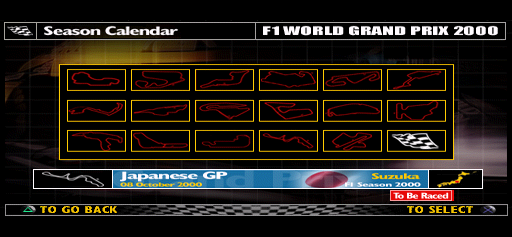
F1 World Grand Prix for the PlayStation brings the high-speed thrill of Formula One racing to your browser. Developed by Eutechnyx and published by Video System, this title captures a full season of the FIA Formula One World Championship with authentic teams, drivers, and circuits. Players can experience both simulation-style technical racing and more forgiving arcade action across multiple game modes, including a unique Challenge Mode that recreates real historical race scenarios.

How to Play

The objective is to master the circuits and cross the finish line first while managing your vehicle’s speed and handling. In the browser, the PlayStation controls are typically mapped as follows: use the Arrow Keys to steer your car, Z to accelerate, and X to brake or reverse. Enter and Shift are used for Start and Select, while the A, S, Q, and W keys handle gear shifting and camera views corresponding to the original console’s shoulder buttons.

Tips

  • Mastering the braking points on each circuit is critical; brake in a straight line before entering a corner to avoid spinning out.
  • If you are new to the game, start in Arcade mode with driving assists enabled to get a feel for the tracks before tackling the strict realism of Simulation mode.
  • Use slipstreaming on long straights to gain a slight speed advantage over the car ahead of you before attempting an overtake.

Player Comments & Discussion: 0 Comments

Leave a Comment / Review:

No comments yet. Be the first gamer to sign the guestbook!

