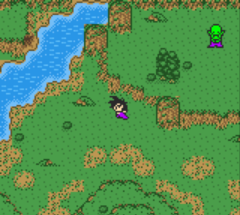
🎮 Play Dragon Ball Z – Densetsu no Chou Senshi-tachi (Japan) Online (Game Boy Color)

🎲 NEXT RANDOM GAME
Dragon Ball Z – Densetsu no Chou Senshi-tachi (Japan) cover art
SAVE SLOTS:

đŸ•šī¸ GAME CONTROLS

Action / ButtonKeyboard Key
D-Pad (Up / Down / Left / Right)Arrow Keys
Button AZ or J
Button BX or K
Button X / Turbo AA or U
Button Y / Turbo BS or I
SelectShift
StartEnter

💡 Tip: You can also connect any USB / Bluetooth Gamepad controller!

Game Rating & Player Reviews: ⭐ Not rated yet
–
☆☆☆☆☆
Be the first to rate
Rate this game (Click 1 to 5 stars):
★ ★ ★ ★ ★

✏️ Suggest an edit to Dragon Ball Z – Densetsu no Chou Senshi-tachi (Japan)

🚩 Report Issue with Dragon Ball Z – Densetsu no Chou Senshi-tachi (Japan):

🎮 VISUAL CONTROLLER MAPPING & GAMEPAD DIAGRAM Auto-Detect: Active
L1 / LB R1 / RB SELECT START Y X A B RETRO ARCADE
Gamepad InputRetro FunctionKeyboard Key
D-Pad / AnalogCharacter Movement / Steering▲ â–ŧ ◄ â–ē
Button A (East)Primary Action / Attack / FireZ / K
Button B (South)Secondary / Jump / CancelX / J
Button X / YSpecial / Turbo / Extra FireA / S
SelectInsert Coin / Select OptionRight Shift
StartGame Start / Pause GameEnter
Game info: đŸ‘ī¸ 111 plays
Dragon Ball Z – Densetsu no Chou Senshi-tachi (Japan)
box cover
Game title:Dragon Ball Z – Densetsu no Chou Senshi-tachi (Japan)
Platform:Game Boy Color
Author (released): Unknown (2002)
Emulator Core:GBC
Game Manual: 📖 Official Manual (Built-in)
Share Game:
License:Freeware / Abandonware
Available online emulators for Dragon Ball Z – Densetsu no Chou Senshi-tachi (Japan):

Different online emulators are available for Dragon Ball Z – Densetsu no Chou Senshi-tachi (Japan). Select an emulator core below for optimal performance:

Emulator Core EngineTechnologyMultiplayerGamepadTouchAdsAction / Switch
EmulatorJS (Default WebAssembly) WebAssembly / JSYESYES YESNO â–ļ ACTIVE
Game Boy / Color (Recommended) WebAssembly / LibretroYESYES YESNO PLAY ⚡
Game description:

Dragon Ball Z – Densetsu no Chou Senshi-tachi (Japan) is a turn-based card-battling RPG released for the Game Boy Color in 2002. Instead of traditional action combat, the game relies on building a strategic deck of attack, defense, and support cards featuring iconic characters from the Dragon Ball Z universe. As a Japanese release, navigating the story mode and card menus requires some trial and error for non-speakers, though the core combat loop of managing your character’s stats and drawing the right cards is straightforward once grasped.

How to Play

The objective is to progress through tactical turn-based battles that closely follow the DBZ storyline, starting from the Saiyan saga. In the browser emulator, the Game Boy Color controls are mapped as follows: use the Arrow keys for the D-pad to navigate menus and select cards, press Z (A button) to confirm selections, and press X (B button) to cancel or go back. The Enter key acts as Start, and Shift is Select.

Tips

Focus on maintaining your character’s speed stat in battle, as moving first often dictates the flow of the card exchanges. Additionally, defensive support cards can be more valuable than pure damage, allowing you to endure enemy ultimate attacks and counter when their ki is depleted.

Player Comments & Discussion: 0 Comments

Leave a Comment / Review:

No comments yet. Be the first gamer to sign the guestbook!