๐ŸŽฎ Play Don Doko Don 2 (Japan) Online (NES)

๐ŸŽฒ NEXT RANDOM GAME
Don Doko Don 2 (Japan) cover art
SAVE SLOTS:

๐Ÿ•น๏ธ GAME CONTROLS

Action / ButtonKeyboard Key
D-Pad (Up / Down / Left / Right)Arrow Keys
Button AZ or J
Button BX or K
Button X / Turbo AA or U
Button Y / Turbo BS or I
SelectShift
StartEnter

๐Ÿ’ก Tip: You can also connect any USB / Bluetooth Gamepad controller!

Game Rating & Player Reviews: โญ Not rated yet
โ€“
โ˜†โ˜†โ˜†โ˜†โ˜†
Be the first to rate
Rate this game (Click 1 to 5 stars):
โ˜… โ˜… โ˜… โ˜… โ˜…

✏️ Suggest an edit to Don Doko Don 2 (Japan)

๐Ÿšฉ Report Issue with Don Doko Don 2 (Japan):

๐ŸŽฎ VISUAL CONTROLLER MAPPING & GAMEPAD DIAGRAM Auto-Detect: Active
L1 / LB R1 / RB SELECT START Y X A B RETRO ARCADE
Gamepad InputRetro FunctionKeyboard Key
D-Pad / AnalogCharacter Movement / Steeringโ–ฒ โ–ผ โ—„ โ–บ
Button A (East)Primary Action / Attack / FireZ / K
Button B (South)Secondary / Jump / CancelX / J
Button X / YSpecial / Turbo / Extra FireA / S
SelectInsert Coin / Select OptionRight Shift
StartGame Start / Pause GameEnter
Game info: ๐Ÿ‘๏ธ 146 plays
Don Doko Don 2 (Japan)
box cover
Game title:Don Doko Don 2 (Japan)
Platform:NES
Author (released): Unknown (1992)
Emulator Core:NES
Game Manual: ๐Ÿ“– Official Manual (Built-in)
Share Game:
License:Freeware / Abandonware
Available online emulators for Don Doko Don 2 (Japan):

Different online emulators are available for Don Doko Don 2 (Japan). Select an emulator core below for optimal performance:

Emulator Core EngineTechnologyMultiplayerGamepadTouchAdsAction / Switch
EmulatorJS (Default WebAssembly) WebAssembly / JSYESYES YESNO โ–ถ ACTIVE
NES / Famicom (Recommended) WebAssembly / LibretroYESYES YESNO PLAY โšก
Nestopia UE (Accurate) WebAssembly / LibretroYESYES YESNO PLAY โšก
Game description:

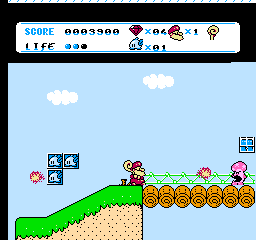
Released exclusively in Japan on January 31, 1992, Don Doko Don 2 is a side-scrolling NES action platformer developed and published by Taito. Expanding beyond the single-screen arcade design of its predecessor, the game follows the bearded dwarf wizard Bob as he journeys through colorful fairytale stages to rescue a kidnapped prince using his trusty magic hammer.

How to Play

Guide Bob through each level, using your magic hammer to strike enemies and stun them into flattened balls. Once stunned, pick up enemies and hurl them across the screen to clear obstacles, defeat other foes, or deal heavy damage to stage bosses.

  • D-Pad / Arrow Keys: Move left or right and duck.
  • Z Key (B Button): Swing hammer / Pick up and throw stunned enemies.
  • X Key (A Button): Jump.
  • Enter (Start): Start or pause the game.
  • Shift (Select): Select options.

Gameplay Tips

  • Chain Collisions: Throwing a stunned enemy into a row of incoming monsters knocks them all out at once, earning higher bonus scores and clearing crowded passages safely.
  • Hammer Stun Timing: Stand close before swinging your hammer so enemies are immediately flattened rather than bouncing back up.
Player Comments & Discussion: 0 Comments

Leave a Comment / Review:

No comments yet. Be the first gamer to sign the guestbook!