🎮 Play Wani Wani World (Japan) Online (Sega Genesis)

🎲 NEXT RANDOM GAME
Wani Wani World (Japan) cover art
SAVE SLOTS:

đŸ•šī¸ GAME CONTROLS

Action / ButtonKeyboard Key
D-Pad (Up / Down / Left / Right)Arrow Keys
Button AZ or J
Button BX or K
Button X / Turbo AA or U
Button Y / Turbo BS or I
SelectShift
StartEnter

💡 Tip: You can also connect any USB / Bluetooth Gamepad controller!

Game Rating & Player Reviews: ⭐ Not rated yet
–
☆☆☆☆☆
Be the first to rate
Rate this game (Click 1 to 5 stars):
★ ★ ★ ★ ★

✏️ Suggest an edit to Wani Wani World (Japan)

🚩 Report Issue with Wani Wani World (Japan):

🎮 VISUAL CONTROLLER MAPPING & GAMEPAD DIAGRAM Auto-Detect: Active
L1 / LB R1 / RB SELECT START Y X A B RETRO ARCADE
Gamepad InputRetro FunctionKeyboard Key
D-Pad / AnalogCharacter Movement / Steering▲ â–ŧ ◄ â–ē
Button A (East)Primary Action / Attack / FireZ / K
Button B (South)Secondary / Jump / CancelX / J
Button X / YSpecial / Turbo / Extra FireA / S
SelectInsert Coin / Select OptionRight Shift
StartGame Start / Pause GameEnter
Game info: đŸ‘ī¸ 126 plays
Wani Wani World (Japan)
box cover
Game title:Wani Wani World (Japan)
Platform:Sega Genesis
Author (released): Unknown (1992)
Emulator Core:SEGAMD
Game Manual: 📖 Official Manual (Built-in)
Share Game:
License:Freeware / Abandonware
Available online emulators for Wani Wani World (Japan):

Different online emulators are available for Wani Wani World (Japan). Select an emulator core below for optimal performance:

Emulator Core EngineTechnologyMultiplayerGamepadTouchAdsAction / Switch
EmulatorJS (Default WebAssembly) WebAssembly / JSYESYES YESNO â–ļ ACTIVE
Sega Genesis / Mega Drive (Recommended) WebAssembly / LibretroYESYES YESNO PLAY ⚡
PicoDrive WebAssembly / LibretroYESYES YESNO PLAY ⚡
Game description:

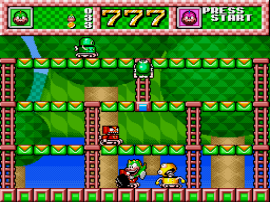
Wani Wani World is a single-screen action platformer originally released for the Sega Genesis. You take control of a crocodile armed with a hammer, tasked with clearing each stage of enemies. Instead of attacking directly, you use your hammer to smash holes in the floor, trapping enemies that walk over them. Once an enemy is stuck, another hit from your hammer will defeat them and turn them into collectible fruit or point items.

To play this Genesis classic in your browser, use the arrow keys to move around the stage. The standard action buttons (A, B, and C) are mapped to Z, X, and C on your keyboard, which you will use to swing your hammer and jump. Press Enter to start the game.

When playing, try to dig multiple holes in a row to trap several enemies at once. If you let an enemy stay in a hole for too long without finishing them off, they will climb out and become faster, so be sure to deal with trapped foes quickly.


Player Comments & Discussion: 0 Comments

Leave a Comment / Review:

No comments yet. Be the first gamer to sign the guestbook!