🎮 Play Video Hustler Online (Arcade)

🎲 NEXT RANDOM GAME
Video Hustler cover art
SAVE SLOTS:

đŸ•šī¸ GAME CONTROLS

Action / ButtonKeyboard Key
D-Pad (Up / Down / Left / Right)Arrow Keys
Button AZ or J
Button BX or K
Button X / Turbo AA or U
Button Y / Turbo BS or I
SelectShift
StartEnter

💡 Tip: You can also connect any USB / Bluetooth Gamepad controller!

Game Rating & Player Reviews: ⭐ Not rated yet
–
☆☆☆☆☆
Be the first to rate
Rate this game (Click 1 to 5 stars):
★ ★ ★ ★ ★

✏️ Suggest an edit to Video Hustler

🚩 Report Issue with Video Hustler:

🎮 VISUAL CONTROLLER MAPPING & GAMEPAD DIAGRAM Auto-Detect: Active
L1 / LB R1 / RB SELECT START Y X A B RETRO ARCADE
Gamepad InputRetro FunctionKeyboard Key
D-Pad / AnalogCharacter Movement / Steering▲ â–ŧ ◄ â–ē
Button A (East)Primary Action / Attack / FireZ / K
Button B (South)Secondary / Jump / CancelX / J
Button X / YSpecial / Turbo / Extra FireA / S
SelectInsert Coin / Select OptionRight Shift
StartGame Start / Pause GameEnter
Game info: đŸ‘ī¸ 134 plays
Video Hustler
box cover
Game title:Video Hustler
Platform:Arcade
Author (released): Unknown (1981)
Emulator Core:MAME2003_PLUS
Game Manual: 📖 Official Manual (Built-in)
Share Game:
License:Freeware / Abandonware
Available online emulators for Video Hustler:

Different online emulators are available for Video Hustler. Select an emulator core below for optimal performance:

Emulator Core EngineTechnologyMultiplayerGamepadTouchAdsAction / Switch
EmulatorJS (Default WebAssembly) WebAssembly / JSYESYES YESNO PLAY ⚡
Arcade (Recommended) WebAssembly / LibretroYESYES YESNO PLAY ⚡
MAME 2003 Plus WebAssembly / LibretroYESYES YESNO PLAY ⚡
FB Alpha 2012 (CPS-1) WebAssembly / LibretroYESYES YESNO â–ļ ACTIVE
FB Alpha 2012 (CPS-2) WebAssembly / LibretroYESYES YESNO PLAY ⚡
Game description:

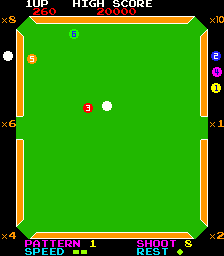
Video Hustler is a classic arcade billiards game released by Konami in 1981. One of the earliest examples of digital pool, it challenges players to clear the table by sinking balls into the six pockets while managing a strict turn limit. With its straightforward top-down perspective and intuitive physics, it set the foundation for decades of virtual cue sports.

How to Play

The objective is to sink all the target balls on the table to advance to the next level. Use the Arrow keys to rotate your cue and adjust your aiming angle. Once lined up, hold the shot button (Z, X, or C) to build up power on the gauge, and release to strike the cue ball. As an arcade game, press Shift (or 5) to insert a coin, and Enter (or 1) to start.

Tips

  • Watch the Power Gauge: Hitting the cue ball too hard can cause it to bounce unpredictably. Use only as much power as necessary for your current shot.
  • Use the Cushions: If a direct shot isn’t available, look for bank shots off the rails to bypass obstacles and reach your target.
Player Comments & Discussion: 0 Comments

Leave a Comment / Review:

No comments yet. Be the first gamer to sign the guestbook!