
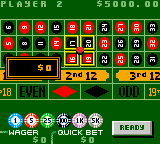
Vegas Games is a casino gambling simulation developed by Digital Eclipse Software and released for the Game Boy Color in 2000. The compilation brings the staple attractions of the casino floor to a handheld format, featuring classic table and machine games including blackjack, roulette, craps, slots, and video poker. Also known as Midnight in Vegas in European regions, it provides players with a starting virtual bankroll to practice betting strategies across multiple game types.
How to Play
Navigate the casino menu and make your game selection using the D-pad (mapped to arrow keys). In most table games, use the D-pad to place your chips on the betting layout, and press A (Z key) to confirm your wagers, deal, or draw cards. Press B (X key) to cancel a bet or back out of a menu, and use Start (Enter) to pause the game or access options.
Tips
- Blackjack basic strategy: Following a standard cheat sheet—such as standing on hard 17 and always splitting aces and eights—will give you the best mathematical odds against the dealer.
- Roulette outside bets: Spreading your wagers across outside options like red/black or odd/even will keep your virtual bankroll stable much longer than chasing high-payout single numbers.
Leave a Comment / Review: