🎮 Play TwinBee 3 – Poko Poko Dai Maou (Japan) Online (NES)

🎲 NEXT RANDOM GAME
TwinBee 3 – Poko Poko Dai Maou (Japan) cover art
SAVE SLOTS:

đŸ•šī¸ GAME CONTROLS

Action / ButtonKeyboard Key
D-Pad (Up / Down / Left / Right)Arrow Keys
Button AZ or J
Button BX or K
Button X / Turbo AA or U
Button Y / Turbo BS or I
SelectShift
StartEnter

💡 Tip: You can also connect any USB / Bluetooth Gamepad controller!

Game Rating & Player Reviews: ⭐ Not rated yet
–
☆☆☆☆☆
Be the first to rate
Rate this game (Click 1 to 5 stars):
★ ★ ★ ★ ★

✏️ Suggest an edit to TwinBee 3 – Poko Poko Dai Maou (Japan)

🚩 Report Issue with TwinBee 3 – Poko Poko Dai Maou (Japan):

🎮 VISUAL CONTROLLER MAPPING & GAMEPAD DIAGRAM Auto-Detect: Active
L1 / LB R1 / RB SELECT START Y X A B RETRO ARCADE
Gamepad InputRetro FunctionKeyboard Key
D-Pad / AnalogCharacter Movement / Steering▲ â–ŧ ◄ â–ē
Button A (East)Primary Action / Attack / FireZ / K
Button B (South)Secondary / Jump / CancelX / J
Button X / YSpecial / Turbo / Extra FireA / S
SelectInsert Coin / Select OptionRight Shift
StartGame Start / Pause GameEnter
Game info: đŸ‘ī¸ 97 plays
TwinBee 3 – Poko Poko Dai Maou (Japan)
box cover
Game title:TwinBee 3 – Poko Poko Dai Maou (Japan)
Platform:NES
Emulator Core:NES
Game Manual: 📖 Official Manual (Built-in)
Share Game:
License:Freeware / Abandonware
Available online emulators for TwinBee 3 – Poko Poko Dai Maou (Japan):

Different online emulators are available for TwinBee 3 – Poko Poko Dai Maou (Japan). Select an emulator core below for optimal performance:

Emulator Core EngineTechnologyMultiplayerGamepadTouchAdsAction / Switch
EmulatorJS (Default WebAssembly) WebAssembly / JSYESYES YESNO â–ļ ACTIVE
NES / Famicom (Recommended) WebAssembly / LibretroYESYES YESNO PLAY ⚡
Nestopia UE (Accurate) WebAssembly / LibretroYESYES YESNO PLAY ⚡
Game description:

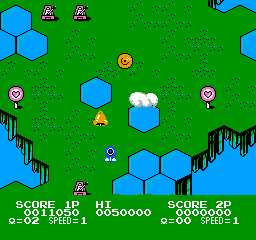
TwinBee 3: Poko Poko Dai Maou is a colorful, vertically scrolling shoot ’em up released by Konami in 1989 for the NES (Famicom). As the third installment in the classic series, it offers a vibrant experience tailored specifically for the console, featuring adjustable difficulty, branching stage paths, and the charming, bell-juggling mechanics the franchise is famous for.

How to Play

Pilot your ship through various stages, shooting down quirky enemy waves and defeating bosses to rescue the kidnapped Princess Melora. Along the way, you can shoot bells out of the clouds and juggle them with your weapon to change their colors, granting powerful weapon upgrades, speed boosts, and shields.

For the NES controls in your browser, use the Arrow Keys to maneuver your ship. Press Z to fire your primary weapon at airborne enemies and X to drop bombs on ground targets. Use Enter for Start and Shift for Select.

Tips

  • Juggle Carefully: Shooting a bell changes its color, which determines the power-up it provides. Be careful not to shoot it too many times, or it will turn into a deadly enemy bee!
  • Ground Attacks: Don’t neglect your bomb attacks. Many enemies and point-scoring items are located on the ground.
  • Recovering Arms: If your ship’s arms are destroyed by enemy fire, you won’t be able to drop bombs. Keep an eye out for a flying ambulance to repair them!

Player Comments & Discussion: 0 Comments

Leave a Comment / Review:

No comments yet. Be the first gamer to sign the guestbook!


