๐ŸŽฎ Play Tomb Raider (USA) Online (PlayStation)

๐ŸŽฒ NEXT RANDOM GAME
Tomb Raider (USA) cover art
SAVE SLOTS:

๐Ÿ•น๏ธ GAME CONTROLS

Action / ButtonKeyboard Key
D-Pad (Up / Down / Left / Right)Arrow Keys
Button AZ or J
Button BX or K
Button X / Turbo AA or U
Button Y / Turbo BS or I
SelectShift
StartEnter

๐Ÿ’ก Tip: You can also connect any USB / Bluetooth Gamepad controller!

Game Rating & Player Reviews: โญ Not rated yet
โ€“
โ˜†โ˜†โ˜†โ˜†โ˜†
Be the first to rate
Rate this game (Click 1 to 5 stars):
โ˜… โ˜… โ˜… โ˜… โ˜…

✏️ Suggest an edit to Tomb Raider (USA)

๐Ÿšฉ Report Issue with Tomb Raider (USA):

๐ŸŽฎ VISUAL CONTROLLER MAPPING & GAMEPAD DIAGRAM Auto-Detect: Active
L1 / LB R1 / RB SELECT START Y X A B RETRO ARCADE
Gamepad InputRetro FunctionKeyboard Key
D-Pad / AnalogCharacter Movement / Steeringโ–ฒ โ–ผ โ—„ โ–บ
Button A (East)Primary Action / Attack / FireZ / K
Button B (South)Secondary / Jump / CancelX / J
Button X / YSpecial / Turbo / Extra FireA / S
SelectInsert Coin / Select OptionRight Shift
StartGame Start / Pause GameEnter
Game info: ๐Ÿ‘๏ธ 171 plays
Tomb Raider (USA)
box cover
Game title:Tomb Raider (USA)
Platform:PlayStation
Emulator Core:PSX
Game Manual: ๐Ÿ“– Official Manual (Built-in)
Share Game:
License:Freeware / Abandonware
Available online emulators for Tomb Raider (USA):

Different online emulators are available for Tomb Raider (USA). Select an emulator core below for optimal performance:

Emulator Core EngineTechnologyMultiplayerGamepadTouchAdsAction / Switch
EmulatorJS (Default WebAssembly) WebAssembly / JSYESYES YESNO โ–ถ ACTIVE
PlayStation (Recommended) WebAssembly / LibretroYESYES YESNO PLAY โšก
Beetle PSX HW WebAssembly / LibretroYESYES YESNO PLAY โšก
Game description:

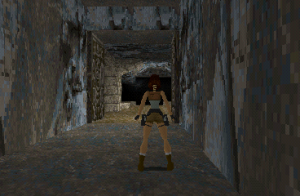
Released in 1996 by Core Design for the PlayStation, Tomb Raider is a pioneering 3D action-adventure game that introduced players to the iconic explorer Lara Croft. Combining atmospheric exploration, intricate environmental puzzles, and platforming, the game tasks you with navigating perilous ancient tombs across the globe to recover the mystical Scion of Atlantis. Its distinct grid-based level design requires precise movement, careful observation, and methodical planning.

How to Play

Your objective is to guide Lara safely through trap-filled environments, defeat hostile wildlife, and pull switches or find keys to progress to the next area. PlayStation controls (which can be mapped to your keyboard or controller in the browser) are as follows:

  • D-Pad: Move (Up to run forward, Down to hop back, Left/Right to turn Lara)
  • X: Action (Grab ledges, pick up items, pull levers, or shoot when weapons are drawn)
  • Square: Jump
  • Circle: Roll (quick 180-degree turn)
  • Triangle: Draw or holster weapons
  • R1: Walk (prevents Lara from falling off ledges)
  • L1: Look around (free look)
  • L2 / R2: Sidestep left / right
  • Start / Select: Pause / Open inventory

Tips

  • Use the Walk button: Holding Walk (R1) ensures Lara will stop at the exact edge of a drop. This is crucial for lining up jumps without accidentally falling to your death.
  • The Perfect Running Jump: To clear wide gaps, walk to the very edge, tap Down once to hop back, then hold Up to run and press Jump. This gives you the exact momentum needed for maximum distance.
  • Conserve ammo: Stick to Lara’s default dual pistolsโ€”which have infinite ammunitionโ€”for standard enemies like wolves and bats. Save your shotgun shells and magnum clips for bosses or tougher predators.
Player Comments & Discussion: 0 Comments

Leave a Comment / Review:

No comments yet. Be the first gamer to sign the guestbook!