🎮 Play Tetris Flash (Japan) Online (NES)

🎲 NEXT RANDOM GAME
Tetris Flash (Japan) cover art
SAVE SLOTS:

đŸ•šī¸ GAME CONTROLS

Action / ButtonKeyboard Key
D-Pad (Up / Down / Left / Right)Arrow Keys
Button AZ or J
Button BX or K
Button X / Turbo AA or U
Button Y / Turbo BS or I
SelectShift
StartEnter

💡 Tip: You can also connect any USB / Bluetooth Gamepad controller!

Game Rating & Player Reviews: ⭐ Not rated yet
–
☆☆☆☆☆
Be the first to rate
Rate this game (Click 1 to 5 stars):
★ ★ ★ ★ ★

✏️ Suggest an edit to Tetris Flash (Japan)

🚩 Report Issue with Tetris Flash (Japan):

🎮 VISUAL CONTROLLER MAPPING & GAMEPAD DIAGRAM Auto-Detect: Active
L1 / LB R1 / RB SELECT START Y X A B RETRO ARCADE
Gamepad InputRetro FunctionKeyboard Key
D-Pad / AnalogCharacter Movement / Steering▲ â–ŧ ◄ â–ē
Button A (East)Primary Action / Attack / FireZ / K
Button B (South)Secondary / Jump / CancelX / J
Button X / YSpecial / Turbo / Extra FireA / S
SelectInsert Coin / Select OptionRight Shift
StartGame Start / Pause GameEnter
Game info: đŸ‘ī¸ 125 plays
Tetris Flash (Japan)
box cover
Game title:Tetris Flash (Japan)
Platform:NES
Author (released): Unknown (1993)
Emulator Core:NES
Game Manual: 📖 Official Manual (Built-in)
Share Game:
License:Freeware / Abandonware
Available online emulators for Tetris Flash (Japan):

Different online emulators are available for Tetris Flash (Japan). Select an emulator core below for optimal performance:

Emulator Core EngineTechnologyMultiplayerGamepadTouchAdsAction / Switch
EmulatorJS (Default WebAssembly) WebAssembly / JSYESYES YESNO â–ļ ACTIVE
NES / Famicom (Recommended) WebAssembly / LibretroYESYES YESNO PLAY ⚡
Nestopia UE (Accurate) WebAssembly / LibretroYESYES YESNO PLAY ⚡
Game description:

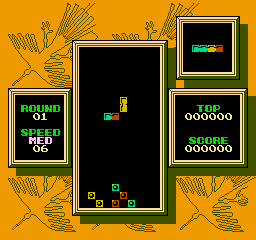
Tetris Flash, released for the NES in 1993, is the Japanese version of the puzzle classic Tetris 2. Instead of the traditional line-clearing mechanics of the original game, this entry shifts the focus to color-matching. Players drop tri-colored blocks into the well to match three or more of the same color, clearing out pre-existing blocks to advance through the levels.

How to Play

Your objective is to clear all the fixed blocks on the screen by matching their colors with the falling pieces. The game features special “Flash” blocks; clearing a Flash block removes all blocks of that specific color from the board instantly. Controls use the standard NES layout: use the Arrow Keys to move your pieces left or right, press the Z or X keys to rotate them, and use the Down arrow to drop pieces faster. Press Enter for Start.

Tips

  • Prioritize clearing the glowing Flash blocks early to quickly remove large sections of the board and simplify the remaining puzzle.
  • Because blocks can disconnect and fall when their supports are cleared, you can plan cascading combos to wipe out multiple colors at once.

Player Comments & Discussion: 0 Comments

Leave a Comment / Review:

No comments yet. Be the first gamer to sign the guestbook!


