🎮 Play Sword of Hope, The (Spain) Online (Game Boy)

🎲 NEXT RANDOM GAME
Sword of Hope, The (Spain) cover art
SAVE SLOTS:

đŸ•šī¸ GAME CONTROLS

Action / ButtonKeyboard Key
D-Pad (Up / Down / Left / Right)Arrow Keys
Button AZ or J
Button BX or K
Button X / Turbo AA or U
Button Y / Turbo BS or I
SelectShift
StartEnter

💡 Tip: You can also connect any USB / Bluetooth Gamepad controller!

Game Rating & Player Reviews: ⭐ Not rated yet
–
☆☆☆☆☆
Be the first to rate
Rate this game (Click 1 to 5 stars):
★ ★ ★ ★ ★

✏️ Suggest an edit to Sword of Hope, The (Spain)

🚩 Report Issue with Sword of Hope, The (Spain):

🎮 VISUAL CONTROLLER MAPPING & GAMEPAD DIAGRAM Auto-Detect: Active
L1 / LB R1 / RB SELECT START Y X A B RETRO ARCADE
Gamepad InputRetro FunctionKeyboard Key
D-Pad / AnalogCharacter Movement / Steering▲ â–ŧ ◄ â–ē
Button A (East)Primary Action / Attack / FireZ / K
Button B (South)Secondary / Jump / CancelX / J
Button X / YSpecial / Turbo / Extra FireA / S
SelectInsert Coin / Select OptionRight Shift
StartGame Start / Pause GameEnter
Game info: đŸ‘ī¸ 90 plays
Sword of Hope, The (Spain)
box cover
Game title:Sword of Hope, The (Spain)
Platform:Game Boy
Author (released): Unknown (1991)
Emulator Core:GB
Game Manual: 📖 Official Manual (Built-in)
Share Game:
License:Freeware / Abandonware
Available online emulators for Sword of Hope, The (Spain):

Different online emulators are available for Sword of Hope, The (Spain). Select an emulator core below for optimal performance:

Emulator Core EngineTechnologyMultiplayerGamepadTouchAdsAction / Switch
EmulatorJS (Default WebAssembly) WebAssembly / JSYESYES YESNO â–ļ ACTIVE
Game Boy / Color (Recommended) WebAssembly / LibretroYESYES YESNO PLAY ⚡
Game description:

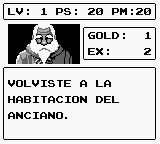
The Sword of Hope is a classic first-person role-playing game developed by Kemco for the Game Boy, released in 1991. Blending traditional turn-based RPG combat with point-and-click adventure mechanics, the game follows Prince Theo on a quest to save the Kingdom of Riches from his corrupted father, King Henric.

How to Play

Players navigate through static, first-person screens using a command menu to examine their surroundings, open chests, and strike enemies. In combat, you can attack, cast magic, or use items to survive challenging random encounters. To play in the browser, use the Arrow keys to move through the command menus, Z (A button) to confirm actions, X (B button) to cancel or go back, and Enter to pause or access the start menu.

Tips

  • Draw a map: The game’s repetitive environments and maze-like forests can be highly disorienting. Keeping a physical map on grid paper will save you from getting lost.
  • Grind early: Enemies hit hard in the opening areas, so spend some time leveling up near a healing location before venturing deeper into the game.
Player Comments & Discussion: 0 Comments

Leave a Comment / Review:

No comments yet. Be the first gamer to sign the guestbook!