🎮 Play Star Wars – Shadows of the Empire (USA) (Rev A) Online (Nintendo 64)

🎲 NEXT RANDOM GAME
Star Wars – Shadows of the Empire (USA) (Rev A) cover art
SAVE SLOTS:

đŸ•šī¸ GAME CONTROLS

Action / ButtonKeyboard Key
D-Pad (Up / Down / Left / Right)Arrow Keys
Button AZ or J
Button BX or K
Button X / Turbo AA or U
Button Y / Turbo BS or I
SelectShift
StartEnter

💡 Tip: You can also connect any USB / Bluetooth Gamepad controller!

Game Rating & Player Reviews: ⭐ Not rated yet
–
☆☆☆☆☆
Be the first to rate
Rate this game (Click 1 to 5 stars):
★ ★ ★ ★ ★

✏️ Suggest an edit to Star Wars – Shadows of the Empire (USA) (Rev A)

🚩 Report Issue with Star Wars – Shadows of the Empire (USA) (Rev A):

🎮 VISUAL CONTROLLER MAPPING & GAMEPAD DIAGRAM Auto-Detect: Active
L1 / LB R1 / RB SELECT START Y X A B RETRO ARCADE
Gamepad InputRetro FunctionKeyboard Key
D-Pad / AnalogCharacter Movement / Steering▲ â–ŧ ◄ â–ē
Button A (East)Primary Action / Attack / FireZ / K
Button B (South)Secondary / Jump / CancelX / J
Button X / YSpecial / Turbo / Extra FireA / S
SelectInsert Coin / Select OptionRight Shift
StartGame Start / Pause GameEnter
Game info: đŸ‘ī¸ 97 plays
Star Wars – Shadows of the Empire (USA) (Rev A)
box cover
Game title:Star Wars – Shadows of the Empire (USA) (Rev A)
Platform:Nintendo 64
Emulator Core:N64
Game Manual: 📖 Official Manual (Built-in)
Share Game:
License:Freeware / Abandonware
Available online emulators for Star Wars – Shadows of the Empire (USA) (Rev A):

Different online emulators are available for Star Wars – Shadows of the Empire (USA) (Rev A). Select an emulator core below for optimal performance:

Emulator Core EngineTechnologyMultiplayerGamepadTouchAdsAction / Switch
EmulatorJS (Default WebAssembly) WebAssembly / JSYESYES YESNO â–ļ ACTIVE
Nintendo 64 (Recommended) WebAssembly / LibretroYESYES YESNO PLAY ⚡
ParaLLEl N64 WebAssembly / LibretroYESYES YESNO PLAY ⚡
Game description:

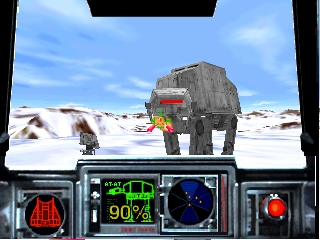
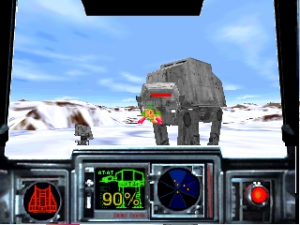
Star Wars: Shadows of the Empire is a 1996 action shooter developed by LucasArts for the Nintendo 64. Set between the events of The Empire Strikes Back and Return of the Jedi, players take on the role of mercenary Dash Rendar. The game features a mix of third-person run-and-gun combat, vehicle segments, and space battles, starting with the iconic defense of Echo Base during the Battle of Hoth.

How to Play

Your objective is to help the Rebel Alliance, battling Imperial forces and bounty hunters across various planets. In the browser, the Nintendo 64 controls are mapped to your keyboard. Use the Arrow Keys (or WASD) to move. Press X or C to fire your weapon and jump, and the Spacebar to interact. The C-buttons, used for camera control and weapon switching, are mapped to I, J, K, and L. Press Enter to pause or access your inventory.

Tips

  • In the opening Hoth level, use your snowspeeder's tow cable to trip the AT-AT walkers by flying close to their legs and wrapping the cable around them several times.
  • Conserve your seeker missiles for difficult encounters or bosses like IG-88, as standard blaster fire is sufficient for most enemies.
  • Use the strafe controls (often mapped to the left and right C-buttons) to dodge incoming fire while keeping your aim locked on enemies.
Player Comments & Discussion: 0 Comments

Leave a Comment / Review:

No comments yet. Be the first gamer to sign the guestbook!