🎮 Play Speed Spin Online (Arcade)

🎲 NEXT RANDOM GAME
Speed Spin cover art
SAVE SLOTS:

đŸ•šī¸ GAME CONTROLS

Action / ButtonKeyboard Key
D-Pad (Up / Down / Left / Right)Arrow Keys
Button AZ or J
Button BX or K
Button X / Turbo AA or U
Button Y / Turbo BS or I
SelectShift
StartEnter

💡 Tip: You can also connect any USB / Bluetooth Gamepad controller!

Game Rating & Player Reviews: ⭐ Not rated yet
–
☆☆☆☆☆
Be the first to rate
Rate this game (Click 1 to 5 stars):
★ ★ ★ ★ ★

✏️ Suggest an edit to Speed Spin

🚩 Report Issue with Speed Spin:

🎮 VISUAL CONTROLLER MAPPING & GAMEPAD DIAGRAM Auto-Detect: Active
L1 / LB R1 / RB SELECT START Y X A B RETRO ARCADE
Gamepad InputRetro FunctionKeyboard Key
D-Pad / AnalogCharacter Movement / Steering▲ â–ŧ ◄ â–ē
Button A (East)Primary Action / Attack / FireZ / K
Button B (South)Secondary / Jump / CancelX / J
Button X / YSpecial / Turbo / Extra FireA / S
SelectInsert Coin / Select OptionRight Shift
StartGame Start / Pause GameEnter
Game info: đŸ‘ī¸ 105 plays
Speed Spin
box cover
Game title:Speed Spin
Platform:Arcade
Author (released): Unknown (1994)
Emulator Core:MAME2003_PLUS
Game Manual: 📖 Official Manual (Built-in)
Share Game:
License:Freeware / Abandonware
Available online emulators for Speed Spin:

Different online emulators are available for Speed Spin. Select an emulator core below for optimal performance:

Emulator Core EngineTechnologyMultiplayerGamepadTouchAdsAction / Switch
EmulatorJS (Default WebAssembly) WebAssembly / JSYESYES YESNO â–ļ ACTIVE
Arcade (Recommended) WebAssembly / LibretroYESYES YESNO PLAY ⚡
MAME 2003 Plus WebAssembly / LibretroYESYES YESNO PLAY ⚡
FB Alpha 2012 (CPS-1) WebAssembly / LibretroYESYES YESNO PLAY ⚡
FB Alpha 2012 (CPS-2) WebAssembly / LibretroYESYES YESNO PLAY ⚡
Game description:

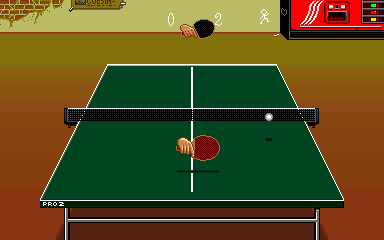
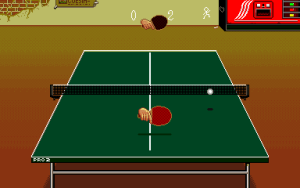
Speed Spin is a table tennis arcade game released in 1994 by TCH. Players step up to the table to compete in high-stakes ping pong matches across two primary modes: a progressive Tour mode featuring training minigames and increasingly difficult opponents, and a World Championship mode to claim the top title. The game captures the fast-paced reflexes of the sport, allowing for serves, spins, and powerful smashes against both AI challengers and local multiplayer opponents.

How to Play

Your objective is to outscore your opponent by hitting the ping pong ball past them while successfully returning their shots. The arcade original used an 8-way joystick and three buttons for different shot types. In the browser, you can typically use the arrow keys to move your paddle and position yourself, while using the primary action keys (often Z, X, and C) to serve, apply spin, and smash the ball.

Tips

  • Pay close attention to your opponent’s paddle angle when they serve to anticipate the direction and spin of the ball.
  • Don’t just rely on standard returns; use the spin button to curve your shots and throw off the AI’s timing.
  • Save your smashes for when the ball is popped up high, but ensure you are positioned correctly to avoid hitting it out of bounds.
Player Comments & Discussion: 0 Comments

Leave a Comment / Review:

No comments yet. Be the first gamer to sign the guestbook!