🎮 Play Shien’s Revenge (USA) (Beta) Online (SNES)

🎲 NEXT RANDOM GAME
Shien’s Revenge (USA) (Beta) cover art
SAVE SLOTS:

đŸ•šī¸ GAME CONTROLS

Action / ButtonKeyboard Key
D-Pad (Up / Down / Left / Right)Arrow Keys
Button AZ or J
Button BX or K
Button X / Turbo AA or U
Button Y / Turbo BS or I
SelectShift
StartEnter

💡 Tip: You can also connect any USB / Bluetooth Gamepad controller!

Game Rating & Player Reviews: ⭐ Not rated yet
–
☆☆☆☆☆
Be the first to rate
Rate this game (Click 1 to 5 stars):
★ ★ ★ ★ ★

✏️ Suggest an edit to Shien’s Revenge (USA) (Beta)

🚩 Report Issue with Shien’s Revenge (USA) (Beta):

🎮 VISUAL CONTROLLER MAPPING & GAMEPAD DIAGRAM Auto-Detect: Active
L1 / LB R1 / RB SELECT START Y X A B RETRO ARCADE
Gamepad InputRetro FunctionKeyboard Key
D-Pad / AnalogCharacter Movement / Steering▲ â–ŧ ◄ â–ē
Button A (East)Primary Action / Attack / FireZ / K
Button B (South)Secondary / Jump / CancelX / J
Button X / YSpecial / Turbo / Extra FireA / S
SelectInsert Coin / Select OptionRight Shift
StartGame Start / Pause GameEnter
Game info: đŸ‘ī¸ 90 plays
Shien’s Revenge (USA) (Beta)
box cover
Game title:Shien’s Revenge (USA) (Beta)
Platform:SNES
Author (released): Unknown (1994)
Emulator Core:SNES
Game Manual: 📖 Official Manual (Built-in)
Share Game:
License:Freeware / Abandonware
Available online emulators for Shien’s Revenge (USA) (Beta):

Different online emulators are available for Shien’s Revenge (USA) (Beta). Select an emulator core below for optimal performance:

Emulator Core EngineTechnologyMultiplayerGamepadTouchAdsAction / Switch
EmulatorJS (Default WebAssembly) WebAssembly / JSYESYES YESNO PLAY ⚡
SNES / Super Famicom (Recommended) WebAssembly / LibretroYESYES YESNO â–ļ ACTIVE
Game description:

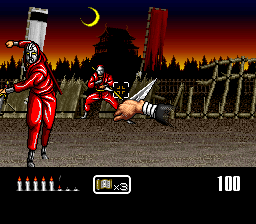
Originally released in 1994, Shien’s Revenge is a fast-paced, first-person action game for the Super Nintendo Entertainment System. Developed by Almanic, it takes the form of an on-rails gallery shooter where you step into the shoes of a ninja named Shien. As the screen automatically scrolls forward through various stages, enemies leap out from the background and sides of the screen, requiring quick reflexes to strike them down before they can land an attack.

How to Play

Your objective is to survive each auto-scrolling stage and defeat the boss at the end. While the game can be played with a standard controller, it was notably designed to support the Super NES Mouse, allowing you to aim an on-screen crosshair to throw projectiles and slash enemies. In your browser, standard SNES controls apply: use the arrow keys to move your cursor, and the Z, X, A, and S keys for your primary actions (mapped to the A, B, X, and Y buttons). Enter acts as Start, and Shift acts as Select. If the emulator supports mouse input, using your physical mouse will provide the most accurate aiming experience.

Tips

  • Focus on intercepting incoming enemy projectiles mid-air rather than just trying to dodge them.
  • Prioritize targets that are actively winding up ranged attacks over melee enemies that are still closing the distance.
  • If you are using standard keyboard controls, try adjusting the cursor speed in the game’s options menu to find a sensitivity that feels comfortable for quick aiming.
Player Comments & Discussion: 0 Comments

Leave a Comment / Review:

No comments yet. Be the first gamer to sign the guestbook!