🎮 Play Penguin Kun Wars Us Online (Arcade)

🎲 NEXT RANDOM GAME
Penguin Kun Wars Us cover art
SAVE SLOTS:

đŸ•šī¸ GAME CONTROLS

Action / ButtonKeyboard Key
D-Pad (Up / Down / Left / Right)Arrow Keys
Button AZ or J
Button BX or K
Button X / Turbo AA or U
Button Y / Turbo BS or I
SelectShift
StartEnter

💡 Tip: You can also connect any USB / Bluetooth Gamepad controller!

Game Rating & Player Reviews: ⭐ Not rated yet
–
☆☆☆☆☆
Be the first to rate
Rate this game (Click 1 to 5 stars):
★ ★ ★ ★ ★

✏️ Suggest an edit to Penguin Kun Wars Us

🚩 Report Issue with Penguin Kun Wars Us:

🎮 VISUAL CONTROLLER MAPPING & GAMEPAD DIAGRAM Auto-Detect: Active
L1 / LB R1 / RB SELECT START Y X A B RETRO ARCADE
Gamepad InputRetro FunctionKeyboard Key
D-Pad / AnalogCharacter Movement / Steering▲ â–ŧ ◄ â–ē
Button A (East)Primary Action / Attack / FireZ / K
Button B (South)Secondary / Jump / CancelX / J
Button X / YSpecial / Turbo / Extra FireA / S
SelectInsert Coin / Select OptionRight Shift
StartGame Start / Pause GameEnter
Game info: đŸ‘ī¸ 106 plays
Penguin Kun Wars Us
box cover
Game title:Penguin Kun Wars Us
Platform:Arcade
Emulator Core:MAME2003_PLUS
Game Manual: 📖 Official Manual (Built-in)
Share Game:
License:Freeware / Abandonware
Available online emulators for Penguin Kun Wars Us:

Different online emulators are available for Penguin Kun Wars Us. Select an emulator core below for optimal performance:

Emulator Core EngineTechnologyMultiplayerGamepadTouchAdsAction / Switch
EmulatorJS (Default WebAssembly) WebAssembly / JSYESYES YESNO PLAY ⚡
Arcade (Recommended) WebAssembly / LibretroYESYES YESNO PLAY ⚡
MAME 2003 Plus WebAssembly / LibretroYESYES YESNO â–ļ ACTIVE
FB Alpha 2012 (CPS-1) WebAssembly / LibretroYESYES YESNO PLAY ⚡
FB Alpha 2012 (CPS-2) WebAssembly / LibretroYESYES YESNO PLAY ⚡
Game description:

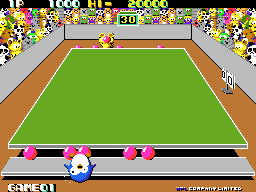
Penguin-Kun Wars is a 1985 arcade action game from UPL, played here in its US release. It’s built around a fictional sport called “Dojiball” — a pun on the Japanese word for dodgeball — where two contestants face off across a long table. Each side starts with five balls and a 60-second clock, and the goal is simple: get every ball onto your opponent’s side before time runs out, or have fewer balls on your side than they do when the clock hits zero.

How to Play

Move left and right along your edge of the table, walk into a ball to pick it up, then throw it across at your opponent. Balls that collide in mid-air bounce off each other, so a thrown ball can knock an incoming one back the way it came. If a ball reaches your edge and hits you, you’re stunned for a couple of seconds and can’t throw — so tracking incoming throws matters as much as aiming your own. In this browser version: Arrow Keys to move, Z to pick up and throw.

Tips

  • A thrown ball can deflect one coming at you, so throwing into traffic is a real defensive option, not just offense.
  • Getting stunned costs several seconds of throwing time — often worse than the single ball that hit you, so staying mobile matters more than trading hits.
  • Watch which balls are already moving toward you before you commit to a throw; picking one up leaves you briefly exposed.
Player Comments & Discussion: 0 Comments

Leave a Comment / Review:

No comments yet. Be the first gamer to sign the guestbook!