🎮 Play Momoko 120 Online (Arcade)

🎲 NEXT RANDOM GAME
Momoko 120 cover art
SAVE SLOTS:

đŸ•šī¸ GAME CONTROLS

Action / ButtonKeyboard Key
D-Pad (Up / Down / Left / Right)Arrow Keys
Button AZ or J
Button BX or K
Button X / Turbo AA or U
Button Y / Turbo BS or I
SelectShift
StartEnter

💡 Tip: You can also connect any USB / Bluetooth Gamepad controller!

Game Rating & Player Reviews: ⭐ Not rated yet
–
☆☆☆☆☆
Be the first to rate
Rate this game (Click 1 to 5 stars):
★ ★ ★ ★ ★

✏️ Suggest an edit to Momoko 120

🚩 Report Issue with Momoko 120:

🎮 VISUAL CONTROLLER MAPPING & GAMEPAD DIAGRAM Auto-Detect: Active
L1 / LB R1 / RB SELECT START Y X A B RETRO ARCADE
Gamepad InputRetro FunctionKeyboard Key
D-Pad / AnalogCharacter Movement / Steering▲ â–ŧ ◄ â–ē
Button A (East)Primary Action / Attack / FireZ / K
Button B (South)Secondary / Jump / CancelX / J
Button X / YSpecial / Turbo / Extra FireA / S
SelectInsert Coin / Select OptionRight Shift
StartGame Start / Pause GameEnter
Game info: đŸ‘ī¸ 88 plays
Momoko 120
box cover
Game title:Momoko 120
Platform:Arcade
Author (released): Unknown (1986)
Emulator Core:MAME2003_PLUS
Game Manual: 📖 Official Manual (Built-in)
Share Game:
License:Freeware / Abandonware
Available online emulators for Momoko 120:

Different online emulators are available for Momoko 120. Select an emulator core below for optimal performance:

Emulator Core EngineTechnologyMultiplayerGamepadTouchAdsAction / Switch
EmulatorJS (Default WebAssembly) WebAssembly / JSYESYES YESNO â–ļ ACTIVE
Arcade (Recommended) WebAssembly / LibretroYESYES YESNO PLAY ⚡
MAME 2003 Plus WebAssembly / LibretroYESYES YESNO PLAY ⚡
FB Alpha 2012 (CPS-1) WebAssembly / LibretroYESYES YESNO PLAY ⚡
FB Alpha 2012 (CPS-2) WebAssembly / LibretroYESYES YESNO PLAY ⚡
Game description:

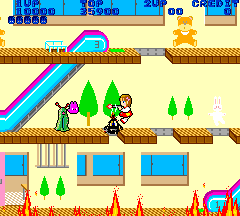
Momoko 120 is a fast-paced vertical run-and-gun platformer released by Jaleco for the Arcade in 1986. You guide Momoko, a young girl attempting to escape a series of burning buildings, as she rapidly ages from a four-year-old toddler into a young adult with each stage cleared. As the flames steadily rise from below, you must race upwards through enemy-filled floors, using trampolines, escalators, and doors to eventually reach the blimp waiting on the roof.

How to Play

The objective is to navigate to the very top of each building before the fire engulfs you, escaping via the blimp on the roof. In your browser, use the arrow keys to move, Z to shoot, X to jump, and Enter or Shift to insert coins and start. A unique quirk of the controls is that to climb ladders, you must rhythmically tap the Up key instead of simply holding it.

Tips

  • Target the Green Aliens: Look for the stationary green aliens that spit out smaller enemies. Destroying all the tiny creatures defeats the main alien, dropping a “P” orb that drastically upgrades your weapon.
  • Pace Your Ascent: While you have to stay ahead of the flames, rushing blindly often leads to colliding with enemies. Inch forward to trigger monster spawns safely before committing to a jump.
Player Comments & Discussion: 0 Comments

Leave a Comment / Review:

No comments yet. Be the first gamer to sign the guestbook!