๐ŸŽฎ Play Logic Pro Japan Online (Arcade)

๐ŸŽฒ NEXT RANDOM GAME
Logic Pro Japan cover art
SAVE SLOTS:

๐Ÿ•น๏ธ GAME CONTROLS

Action / ButtonKeyboard Key
D-Pad (Up / Down / Left / Right)Arrow Keys
Button AZ or J
Button BX or K
Button X / Turbo AA or U
Button Y / Turbo BS or I
SelectShift
StartEnter

๐Ÿ’ก Tip: You can also connect any USB / Bluetooth Gamepad controller!

Game Rating & Player Reviews: โญ Not rated yet
โ€“
โ˜†โ˜†โ˜†โ˜†โ˜†
Be the first to rate
Rate this game (Click 1 to 5 stars):
โ˜… โ˜… โ˜… โ˜… โ˜…

✏️ Suggest an edit to Logic Pro Japan

๐Ÿšฉ Report Issue with Logic Pro Japan:

๐ŸŽฎ VISUAL CONTROLLER MAPPING & GAMEPAD DIAGRAM Auto-Detect: Active
L1 / LB R1 / RB SELECT START Y X A B RETRO ARCADE
Gamepad InputRetro FunctionKeyboard Key
D-Pad / AnalogCharacter Movement / Steeringโ–ฒ โ–ผ โ—„ โ–บ
Button A (East)Primary Action / Attack / FireZ / K
Button B (South)Secondary / Jump / CancelX / J
Button X / YSpecial / Turbo / Extra FireA / S
SelectInsert Coin / Select OptionRight Shift
StartGame Start / Pause GameEnter
Game info: ๐Ÿ‘๏ธ 176 plays
Logic Pro Japan
box cover
Game title:Logic Pro Japan
Platform:Arcade
Author (released): Unknown (1996)
Emulator Core:MAME2003_PLUS
Game Manual: ๐Ÿ“– Official Manual (Built-in)
Share Game:
License:Freeware / Abandonware
Available online emulators for Logic Pro Japan:

Different online emulators are available for Logic Pro Japan. Select an emulator core below for optimal performance:

Emulator Core EngineTechnologyMultiplayerGamepadTouchAdsAction / Switch
EmulatorJS (Default WebAssembly) WebAssembly / JSYESYES YESNO โ–ถ ACTIVE
Arcade (Recommended) WebAssembly / LibretroYESYES YESNO PLAY โšก
MAME 2003 Plus WebAssembly / LibretroYESYES YESNO PLAY โšก
FB Alpha 2012 (CPS-1) WebAssembly / LibretroYESYES YESNO PLAY โšก
FB Alpha 2012 (CPS-2) WebAssembly / LibretroYESYES YESNO PLAY โšก
Game description:

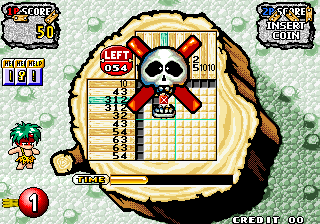
Logic Pro Japan is an arcade puzzle game released in 1996. Bringing the classic nonogram (or Picross) formula to the arcades, players must reveal hidden pixel-art pictures by filling in a grid according to numerical clues along the edges. It challenges players to use logical deduction to complete each picture before the timer runs out.

How to play

The objective is to fill in the correct squares on the grid while avoiding mistakes. The numbers on the top and left sides indicate the lengths of consecutive filled squares in that row or column. Use the directional controls to move your cursor across the grid, the primary button to fill a square, and the secondary button to mark a square with an ‘X’ to indicate it should remain empty. Arcade controls are typically mapped to the arrow keys for movement, with Z and X for your primary actions, and Shift/Enter for Insert Coin and Start.

Tips

  • Start by looking for large numbers that take up most or all of a row or column, as these are the easiest to fill in safely.
  • Use the ‘X’ marker liberally. Marking squares you know must be empty is just as important as filling in the correct ones, as it narrows down the possibilities for intersecting lines.
  • Keep an eye on the timer. Arcade puzzle games often have strict time limits, so try to build momentum and avoid guessing, which can lead to time penalties.
Player Comments & Discussion: 0 Comments

Leave a Comment / Review:

No comments yet. Be the first gamer to sign the guestbook!