๐ŸŽฎ Play Kirby In Sonic The Hedgehog Online (Sega Genesis)

๐ŸŽฒ NEXT RANDOM GAME
Kirby In Sonic The Hedgehog cover art
SAVE SLOTS:

๐Ÿ•น๏ธ GAME CONTROLS

Action / ButtonKeyboard Key
D-Pad (Up / Down / Left / Right)Arrow Keys
Button AZ or J
Button BX or K
Button X / Turbo AA or U
Button Y / Turbo BS or I
SelectShift
StartEnter

๐Ÿ’ก Tip: You can also connect any USB / Bluetooth Gamepad controller!

Game Rating & Player Reviews: โญ Not rated yet
โ€“
โ˜†โ˜†โ˜†โ˜†โ˜†
Be the first to rate
Rate this game (Click 1 to 5 stars):
โ˜… โ˜… โ˜… โ˜… โ˜…

✏️ Suggest an edit to Kirby In Sonic The Hedgehog

๐Ÿšฉ Report Issue with Kirby In Sonic The Hedgehog:

๐ŸŽฎ VISUAL CONTROLLER MAPPING & GAMEPAD DIAGRAM Auto-Detect: Active
L1 / LB R1 / RB SELECT START Y X A B RETRO ARCADE
Gamepad InputRetro FunctionKeyboard Key
D-Pad / AnalogCharacter Movement / Steeringโ–ฒ โ–ผ โ—„ โ–บ
Button A (East)Primary Action / Attack / FireZ / K
Button B (South)Secondary / Jump / CancelX / J
Button X / YSpecial / Turbo / Extra FireA / S
SelectInsert Coin / Select OptionRight Shift
StartGame Start / Pause GameEnter
Game info: ๐Ÿ‘๏ธ 108 plays
Kirby In Sonic The Hedgehog
box cover
Game title:Kirby In Sonic The Hedgehog
Platform:Sega Genesis
Emulator Core:SEGAMD
Game Manual: ๐Ÿ“– Official Manual (Built-in)
Share Game:
License:Freeware / Abandonware
Available online emulators for Kirby In Sonic The Hedgehog:

Different online emulators are available for Kirby In Sonic The Hedgehog. Select an emulator core below for optimal performance:

Emulator Core EngineTechnologyMultiplayerGamepadTouchAdsAction / Switch
EmulatorJS (Default WebAssembly) WebAssembly / JSYESYES YESNO โ–ถ ACTIVE
Sega Genesis / Mega Drive (Recommended) WebAssembly / LibretroYESYES YESNO PLAY โšก
PicoDrive WebAssembly / LibretroYESYES YESNO PLAY โšก
Game description:

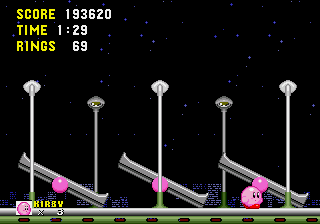
Kirby in Sonic the Hedgehog is a celebrated Sega Genesis ROM hack by Lone Devil that swaps Sonic out for Nintendo’s pink puffball. Instead of just a simple sprite replacement, Kirby brings his own distinct mechanics to the Sonic engine. He can inhale enemies and item monitors (though he doesn’t copy abilities here), and he can jump repeatedly to float right over difficult platforming sections.

The game replaces Sonic’s traditional ring-based survival with a health bar system. While rings no longer protect you from taking damage, collecting 50 rings will replenish your health. There are four difficulty modes available on the title screenโ€”from a Beginner mode that restores the classic Sonic ring rules to an Insane mode that removes 1-Up lampposts and continues.

How to play

Navigate the classic Sonic zones using Kirby’s unique moveset to reach the end of each act. For standard Sega Genesis controls in your browser, use the Arrow Keys to move and duck. Press Z, X, or C to jump, and press it again in mid-air to float. Hold down your action key to inhale enemies and monitors.

Tips

  • If you find the platforming tricky, you can literally float over most of the stage’s hazardsโ€”just keep tapping jump.
  • Since rings don’t protect you from spikes or badniks on normal difficulties, focus more on preserving your health bar than hoarding rings.
  • Inhaling an enemy and spitting them out as a star is a great way to safely take out other badniks in your path from a distance.


http://info.sonicretro.org/Kirby_in_Sonic_the_Hedgehog

Player Comments & Discussion: 0 Comments

Leave a Comment / Review:

No comments yet. Be the first gamer to sign the guestbook!