
๐ŸŽฎ Play Jimmy Connors Pro Tennis Tour Online (DOS)

๐ŸŽฒ NEXT RANDOM GAME
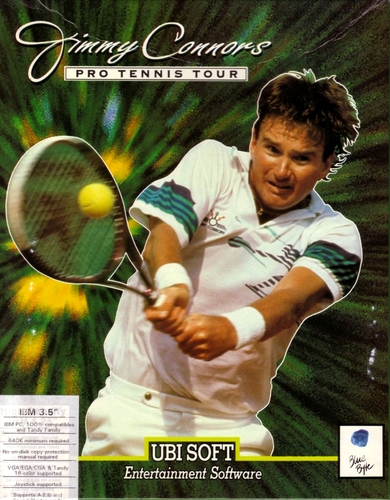
Jimmy Connors Pro Tennis Tour cover art
SAVE SLOTS:

๐Ÿ•น๏ธ GAME CONTROLS

Action / ButtonKeyboard Key
D-Pad (Up / Down / Left / Right)Arrow Keys
Button AZ or J
Button BX or K
Button X / Turbo AA or U
Button Y / Turbo BS or I
SelectShift
StartEnter

๐Ÿ’ก Tip: You can also connect any USB / Bluetooth Gamepad controller!

Game Rating & Player Reviews: โญ Not rated yet
โ€“
โ˜†โ˜†โ˜†โ˜†โ˜†
Be the first to rate
Rate this game (Click 1 to 5 stars):
โ˜… โ˜… โ˜… โ˜… โ˜…

✏️ Suggest an edit to Jimmy Connors Pro Tennis Tour

๐Ÿšฉ Report Issue with Jimmy Connors Pro Tennis Tour:

๐ŸŽฎ VISUAL CONTROLLER MAPPING & GAMEPAD DIAGRAM Auto-Detect: Active
L1 / LB R1 / RB SELECT START Y X A B RETRO ARCADE
Gamepad InputRetro FunctionKeyboard Key
D-Pad / AnalogCharacter Movement / Steeringโ–ฒ โ–ผ โ—„ โ–บ
Button A (East)Primary Action / Attack / FireZ / K
Button B (South)Secondary / Jump / CancelX / J
Button X / YSpecial / Turbo / Extra FireA / S
SelectInsert Coin / Select OptionRight Shift
StartGame Start / Pause GameEnter
Game info: ๐Ÿ‘๏ธ 99 plays
Jimmy Connors Pro Tennis Tour
box cover
Game title:Jimmy Connors Pro Tennis Tour
Platform:DOS
Author (released): Blue Byte Software (1989)
Genre:Sport
Mode:Multiplayer
Game size:375 kB
Emulator Core:DOS
Game Manual: ๐Ÿ“– Official Manual (Built-in)
Share Game:
License:Freeware / Abandonware
Available online emulators for Jimmy Connors Pro Tennis Tour:

Different online emulators are available for Jimmy Connors Pro Tennis Tour. Select an emulator core below for optimal performance:

Emulator Core EngineTechnologyMultiplayerGamepadTouchAdsAction / Switch
EmulatorJS (Default WebAssembly) WebAssembly / JSYESYES YESNO โ–ถ ACTIVE
MS-DOS (Recommended) WebAssembly / LibretroYESYES YESNO PLAY โšก
JS-DOS v3.0 / DOSBox Engine Emscripten C++YESYES NONO PLAY โšก
Game description:

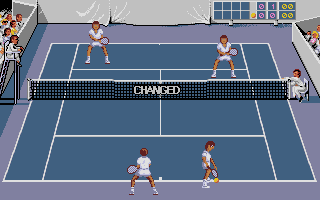
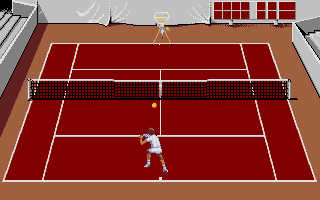
Jimmy Connors Pro Tennis Tour is a competitive sports game released by Blue Byte Software for DOS in 1989. You take on the role of a professional tennis player competing in major international tournaments. Known for its challenging difficulty and smooth animations for the era, the game demands precision and strategic court positioning. You can play against the computer or face off against a friend in local multiplayer.

How to play

Your goal is to win matches across different court surfaces by outmaneuvering your opponent. Success relies on positioning yourself early and mastering the timing of your swing. The game uses the original MS-DOS keyboard controls, typically relying on the arrow keys for movement and the spacebar or enter key to serve and return. You can share the keyboard with a second player for head-to-head matches. Press Right Alt + Enter to toggle fullscreen mode.

Tips

  • Use the shadow: Pay close attention to the ball’s shadow to gauge its depth and trajectory, which helps you get into position before the bounce.
  • Shot timing determines direction: The angle of your return is heavily influenced by when you strike the ball. Hitting the ball early will pull it cross-court, while hitting it late will send it down the line.
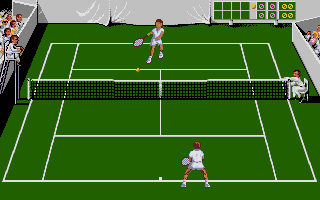
Screenshots:
Jimmy Connors Pro Tennis Tour Screenshot
Player Comments & Discussion: 0 Comments

Leave a Comment / Review:

No comments yet. Be the first gamer to sign the guestbook!