🎮 Play Flying Dragon (USA) Online (Nintendo 64)

🎲 NEXT RANDOM GAME
Flying Dragon (USA) cover art
SAVE SLOTS:

đŸ•šī¸ GAME CONTROLS

Action / ButtonKeyboard Key
D-Pad (Up / Down / Left / Right)Arrow Keys
Button AZ or J
Button BX or K
Button X / Turbo AA or U
Button Y / Turbo BS or I
SelectShift
StartEnter

💡 Tip: You can also connect any USB / Bluetooth Gamepad controller!

Game Rating & Player Reviews: ⭐ Not rated yet
–
☆☆☆☆☆
Be the first to rate
Rate this game (Click 1 to 5 stars):
★ ★ ★ ★ ★

✏️ Suggest an edit to Flying Dragon (USA)

🚩 Report Issue with Flying Dragon (USA):

🎮 VISUAL CONTROLLER MAPPING & GAMEPAD DIAGRAM Auto-Detect: Active
L1 / LB R1 / RB SELECT START Y X A B RETRO ARCADE
Gamepad InputRetro FunctionKeyboard Key
D-Pad / AnalogCharacter Movement / Steering▲ â–ŧ ◄ â–ē
Button A (East)Primary Action / Attack / FireZ / K
Button B (South)Secondary / Jump / CancelX / J
Button X / YSpecial / Turbo / Extra FireA / S
SelectInsert Coin / Select OptionRight Shift
StartGame Start / Pause GameEnter
Game info: đŸ‘ī¸ 144 plays
Flying Dragon (USA)
box cover
Game title:Flying Dragon (USA)
Platform:Nintendo 64
Author (released): Unknown (1998)
Emulator Core:N64
Game Manual: 📖 Official Manual (Built-in)
Share Game:
License:Freeware / Abandonware
Available online emulators for Flying Dragon (USA):

Different online emulators are available for Flying Dragon (USA). Select an emulator core below for optimal performance:

Emulator Core EngineTechnologyMultiplayerGamepadTouchAdsAction / Switch
EmulatorJS (Default WebAssembly) WebAssembly / JSYESYES YESNO â–ļ ACTIVE
Nintendo 64 (Recommended) WebAssembly / LibretroYESYES YESNO PLAY ⚡
ParaLLEl N64 WebAssembly / LibretroYESYES YESNO PLAY ⚡
Game description:

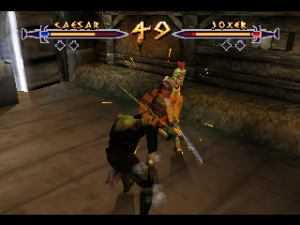
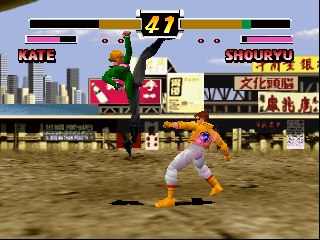
Flying Dragon is a unique Nintendo 64 fighting game released in 1998 by Culture Brain. Rather than offering just a single style of gameplay, it packs two distinct fighting games into one cartridge. The “Virtual Mode” provides a traditional 3D fighting experience with a cast of martial artists competing in a tournament. Meanwhile, the “SD Mode” features super-deformed (chibi) characters and introduces RPG mechanics, allowing you to equip items, level up your fighters, and customize their abilities as you progress.

How to Play

Your objective varies by mode, but the core goal is to master your fighter’s moveset and defeat your opponents. In the browser emulator, the default Nintendo 64 controls are typically mapped to your keyboard: use the Arrow Keys for movement, and keys like X, C, and Spacebar for the A, B, and Z buttons. Check the emulator’s settings menu (usually accessible via an on-screen button or by pressing Esc) to see the exact mappings and customize the layout to your preference.

Tips

  • Explore SD Mode’s depth: Take advantage of the RPG elements in SD mode. Replaying matches to earn better equipment can give you a significant edge in tougher fights.
  • Master the block: In Virtual Mode, learning the timing for blocks and counters is crucial, as the AI can be surprisingly aggressive.

Player Comments & Discussion: 0 Comments

Leave a Comment / Review:

No comments yet. Be the first gamer to sign the guestbook!