๐ŸŽฎ Play Finest Hour Japan Online (Arcade)

๐ŸŽฒ NEXT RANDOM GAME
Finest Hour Japan cover art
SAVE SLOTS:

๐Ÿ•น๏ธ GAME CONTROLS

Action / ButtonKeyboard Key
D-Pad (Up / Down / Left / Right)Arrow Keys
Button AZ or J
Button BX or K
Button X / Turbo AA or U
Button Y / Turbo BS or I
SelectShift
StartEnter

๐Ÿ’ก Tip: You can also connect any USB / Bluetooth Gamepad controller!

Game Rating & Player Reviews: โญ Not rated yet
โ€“
โ˜†โ˜†โ˜†โ˜†โ˜†
Be the first to rate
Rate this game (Click 1 to 5 stars):
โ˜… โ˜… โ˜… โ˜… โ˜…

✏️ Suggest an edit to Finest Hour Japan

๐Ÿšฉ Report Issue with Finest Hour Japan:

๐ŸŽฎ VISUAL CONTROLLER MAPPING & GAMEPAD DIAGRAM Auto-Detect: Active
L1 / LB R1 / RB SELECT START Y X A B RETRO ARCADE
Gamepad InputRetro FunctionKeyboard Key
D-Pad / AnalogCharacter Movement / Steeringโ–ฒ โ–ผ โ—„ โ–บ
Button A (East)Primary Action / Attack / FireZ / K
Button B (South)Secondary / Jump / CancelX / J
Button X / YSpecial / Turbo / Extra FireA / S
SelectInsert Coin / Select OptionRight Shift
StartGame Start / Pause GameEnter
Game info: ๐Ÿ‘๏ธ 127 plays
Finest Hour Japan
box cover
Game title:Finest Hour Japan
Platform:Arcade
Author (released): Unknown (1989)
Emulator Core:MAME2003_PLUS
Game Manual: ๐Ÿ“– Official Manual (Built-in)
Share Game:
License:Freeware / Abandonware
Available online emulators for Finest Hour Japan:

Different online emulators are available for Finest Hour Japan. Select an emulator core below for optimal performance:

Emulator Core EngineTechnologyMultiplayerGamepadTouchAdsAction / Switch
EmulatorJS (Default WebAssembly) WebAssembly / JSYESYES YESNO โ–ถ ACTIVE
Arcade (Recommended) WebAssembly / LibretroYESYES YESNO PLAY โšก
MAME 2003 Plus WebAssembly / LibretroYESYES YESNO PLAY โšก
FB Alpha 2012 (CPS-1) WebAssembly / LibretroYESYES YESNO PLAY โšก
FB Alpha 2012 (CPS-2) WebAssembly / LibretroYESYES YESNO PLAY โšก
Game description:

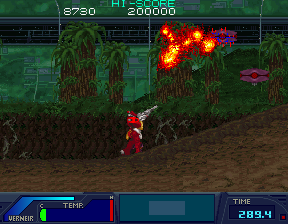
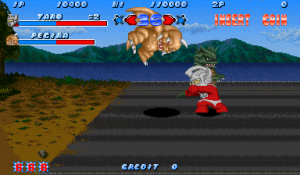
Finest Hour is a side-scrolling run-and-gun arcade game released by Namco in 1989, originally exclusive to Japan. You pilot the heavily armed battlemech Sygnus through intense combat zones, fighting off waves of robotic enemies. Instead of a traditional health bar, the game uses a unique temperature gaugeโ€”taking damage or remaining in combat causes your mech to heat up, and if you overheat, the game ends. You must carefully manage your mobility and firepower to survive the onslaught.

How to Play

Your objective is to reach the end of each stage before the timer expires or your mech overheats. The game features three primary actions: firing your main weapon, using the Vernier jump jets for mobility, and deploying a targeting marker.

  • Move: Arrow Keys (Double-tap left or right to dash)
  • Shot (Fire): Z
  • Vernier (Jump/Hover): X
  • Marker (Targeting): A or S
  • Insert Coin: Shift
  • Start: Enter

Tips

  • Keep moving. Lingering in combat increases your temperature gauge, so press forward aggressively rather than playing defensively.
  • Master the dash mechanic (double-tap a direction). It is essential for evading heavy enemy fire and quickly repositioning.
  • Your Vernier jump jets can be used for sustained hovering to bypass ground obstacles and position yourself for aerial shots.
Player Comments & Discussion: 0 Comments

Leave a Comment / Review:

No comments yet. Be the first gamer to sign the guestbook!