๐ŸŽฎ Play Extreme Pinball Online (PlayStation)

๐ŸŽฒ NEXT RANDOM GAME
Extreme Pinball cover art
SAVE SLOTS:

๐Ÿ•น๏ธ GAME CONTROLS

Action / ButtonKeyboard Key
D-Pad (Up / Down / Left / Right)Arrow Keys
Button AZ or J
Button BX or K
Button X / Turbo AA or U
Button Y / Turbo BS or I
SelectShift
StartEnter

๐Ÿ’ก Tip: You can also connect any USB / Bluetooth Gamepad controller!

Game Rating & Player Reviews: โญ Not rated yet
โ€“
โ˜†โ˜†โ˜†โ˜†โ˜†
Be the first to rate
Rate this game (Click 1 to 5 stars):
โ˜… โ˜… โ˜… โ˜… โ˜…

✏️ Suggest an edit to Extreme Pinball

๐Ÿšฉ Report Issue with Extreme Pinball:

๐ŸŽฎ VISUAL CONTROLLER MAPPING & GAMEPAD DIAGRAM Auto-Detect: Active
L1 / LB R1 / RB SELECT START Y X A B RETRO ARCADE
Gamepad InputRetro FunctionKeyboard Key
D-Pad / AnalogCharacter Movement / Steeringโ–ฒ โ–ผ โ—„ โ–บ
Button A (East)Primary Action / Attack / FireZ / K
Button B (South)Secondary / Jump / CancelX / J
Button X / YSpecial / Turbo / Extra FireA / S
SelectInsert Coin / Select OptionRight Shift
StartGame Start / Pause GameEnter
Game info: ๐Ÿ‘๏ธ 159 plays
Extreme Pinball
box cover
Game title:Extreme Pinball
Platform:PlayStation
Emulator Core:PSX
Game Manual: ๐Ÿ“– Official Manual (Built-in)
Share Game:
License:Freeware / Abandonware
Available online emulators for Extreme Pinball:

Different online emulators are available for Extreme Pinball. Select an emulator core below for optimal performance:

Emulator Core EngineTechnologyMultiplayerGamepadTouchAdsAction / Switch
EmulatorJS (Default WebAssembly) WebAssembly / JSYESYES YESNO โ–ถ ACTIVE
PlayStation (Recommended) WebAssembly / LibretroYESYES YESNO PLAY โšก
Beetle PSX HW WebAssembly / LibretroYESYES YESNO PLAY โšก
Game description:

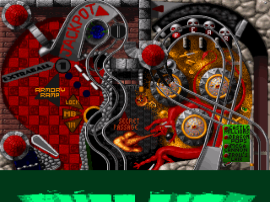
Extreme Pinball is an arcade-style pinball simulation released for the PlayStation in 1996, bringing the fast-paced action of the PC original to the console. Developed by Digital Extremes and published by Electronic Arts, the game features four distinct tables: Urban Chaos, Rock Fantasy, Monkey Mayhem, and Medieval Knights. Each table offers unique thematic music, dot-matrix animations, and specific missions that go beyond simply keeping the ball in play.

How to Play

The goal is to rack up high scores by hitting bumpers, completing ramp sequences, and triggering multi-ball modes. In this browser emulator, the game uses standard PlayStation controls mapped to your keyboard. Use the Arrow Keys to navigate menus or nudge the table. The shoulder buttons (typically mapped to Q and W for L1/R1) or the face buttons (X for Cross, Z for Circle) operate the left and right flippers. Press Enter (Start) to begin or pause, and use the D-pad down or a face button to pull the plunger and launch the ball.

Tips

  • Master the Trap: Instead of wildly flipping as the ball descends, hold the flipper up to catch and trap the ball. This allows you to line up precise shots at ramps and targets.
  • Skill Shots: Each table features a skill shot at the start of a ball. Control the power of your plunge to hit the lit rollovers or targets immediately for a quick point boost.
  • Learn the Table Rules: Pay attention to the dot-matrix display. It will guide you on which ramps to hit to start missions or activate multi-ball, which is essential for scoring big.
Player Comments & Discussion: 0 Comments

Leave a Comment / Review:

No comments yet. Be the first gamer to sign the guestbook!