🎮 Play Dragon Tail (Japan) Online (Game Boy)

🎲 NEXT RANDOM GAME
Dragon Tail (Japan) cover art
SAVE SLOTS:

đŸ•šī¸ GAME CONTROLS

Action / ButtonKeyboard Key
D-Pad (Up / Down / Left / Right)Arrow Keys
Button AZ or J
Button BX or K
Button X / Turbo AA or U
Button Y / Turbo BS or I
SelectShift
StartEnter

💡 Tip: You can also connect any USB / Bluetooth Gamepad controller!

Game Rating & Player Reviews: ⭐ Not rated yet
–
☆☆☆☆☆
Be the first to rate
Rate this game (Click 1 to 5 stars):
★ ★ ★ ★ ★

✏️ Suggest an edit to Dragon Tail (Japan)

🚩 Report Issue with Dragon Tail (Japan):

🎮 VISUAL CONTROLLER MAPPING & GAMEPAD DIAGRAM Auto-Detect: Active
L1 / LB R1 / RB SELECT START Y X A B RETRO ARCADE
Gamepad InputRetro FunctionKeyboard Key
D-Pad / AnalogCharacter Movement / Steering▲ â–ŧ ◄ â–ē
Button A (East)Primary Action / Attack / FireZ / K
Button B (South)Secondary / Jump / CancelX / J
Button X / YSpecial / Turbo / Extra FireA / S
SelectInsert Coin / Select OptionRight Shift
StartGame Start / Pause GameEnter
Game info: đŸ‘ī¸ 82 plays
Dragon Tail (Japan)
box cover
Game title:Dragon Tail (Japan)
Platform:Game Boy
Author (released): Unknown (1990)
Emulator Core:GB
Game Manual: 📖 Official Manual (Built-in)
Share Game:
License:Freeware / Abandonware
Available online emulators for Dragon Tail (Japan):

Different online emulators are available for Dragon Tail (Japan). Select an emulator core below for optimal performance:

Emulator Core EngineTechnologyMultiplayerGamepadTouchAdsAction / Switch
EmulatorJS (Default WebAssembly) WebAssembly / JSYESYES YESNO â–ļ ACTIVE
Game Boy / Color (Recommended) WebAssembly / LibretroYESYES YESNO PLAY ⚡
Game description:

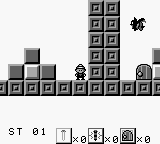
Dragon Tail is a 1990 puzzle-platformer developed by Bit2 and released for the Game Boy by I’Max, later localized in Western markets as Nail ‘n’ Scale. Players control Spike, an adventurer navigating 51 increasingly complex levels by throwing climbing spikes into walls to create temporary platforms and stairs to reach the exit.

How to Play

The main objective in each stage is to reach the exit door while navigating hazards and enemies. Using the default browser controls (arrow keys to move, Z and X to jump and throw spikes, and Enter for Start), you can toss spikes horizontally or vertically into walls to climb higher and cross gaps.

Tips

  • Spikes can be used offensively to defeat enemies or as tools to break specific obstructing blocks in your path.
  • Because placed spikes disappear after a short time or when too many are placed, it is crucial to plan your climbing route before committing to a jump.
  • You can throw spikes directly upward, which is required to scale tight vertical shafts and reach overhead areas.

Player Comments & Discussion: 0 Comments

Leave a Comment / Review:

No comments yet. Be the first gamer to sign the guestbook!