🎮 Play Cocoron (Japan) Online (NES)

🎲 NEXT RANDOM GAME
Cocoron (Japan) cover art
SAVE SLOTS:

đŸ•šī¸ GAME CONTROLS

Action / ButtonKeyboard Key
D-Pad (Up / Down / Left / Right)Arrow Keys
Button AZ or J
Button BX or K
Button X / Turbo AA or U
Button Y / Turbo BS or I
SelectShift
StartEnter

💡 Tip: You can also connect any USB / Bluetooth Gamepad controller!

Game Rating & Player Reviews: ⭐ Not rated yet
–
☆☆☆☆☆
Be the first to rate
Rate this game (Click 1 to 5 stars):
★ ★ ★ ★ ★

✏️ Suggest an edit to Cocoron (Japan)

🚩 Report Issue with Cocoron (Japan):

🎮 VISUAL CONTROLLER MAPPING & GAMEPAD DIAGRAM Auto-Detect: Active
L1 / LB R1 / RB SELECT START Y X A B RETRO ARCADE
Gamepad InputRetro FunctionKeyboard Key
D-Pad / AnalogCharacter Movement / Steering▲ â–ŧ ◄ â–ē
Button A (East)Primary Action / Attack / FireZ / K
Button B (South)Secondary / Jump / CancelX / J
Button X / YSpecial / Turbo / Extra FireA / S
SelectInsert Coin / Select OptionRight Shift
StartGame Start / Pause GameEnter
Game info: đŸ‘ī¸ 120 plays
Cocoron (Japan)
box cover
Game title:Cocoron (Japan)
Platform:NES
Author (released): Unknown (1991)
Emulator Core:NES
Game Manual: 📖 Official Manual (Built-in)
Share Game:
License:Freeware / Abandonware
Available online emulators for Cocoron (Japan):

Different online emulators are available for Cocoron (Japan). Select an emulator core below for optimal performance:

Emulator Core EngineTechnologyMultiplayerGamepadTouchAdsAction / Switch
EmulatorJS (Default WebAssembly) WebAssembly / JSYESYES YESNO â–ļ ACTIVE
NES / Famicom (Recommended) WebAssembly / LibretroYESYES YESNO PLAY ⚡
Nestopia UE (Accurate) WebAssembly / LibretroYESYES YESNO PLAY ⚡
Game description:

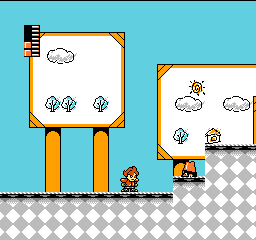
Developed by K2 and published by Takeru in 1991 for the Famicom, Cocoron is a side-scrolling action platformer designed by Akira Kitamura, the creator of Mega Man. The game stands out for its deep character customization system: before embarking on a mission to rescue Princess Ruff in Dream World, players assemble their hero from a variety of distinct heads, bodies, and weapons, each altering speed, jump height, weight, and combat strategy. With a non-linear stage selection similar to Kitamura’s previous works, every play-through offers a unique experience depending on how you build your character.

How to Play

Choose your character parts in the creation screen to balance power, speed, and attack range, then select your stage order on the world map. Guide your custom hero through enemy-filled levels, avoiding hazards and defeating bosses to restore light to Dream World.

Browser Controls

  • Arrow Keys: Move left/right, crouch, aim
  • Z Key: Jump
  • X Key: Attack / Fire weapon
  • Enter: Start / Pause
  • Shift: Select / Sub-menu

Tips & Strategy

  • Match body parts to terrain: Jet pack and wings offer higher jumps and mobility across wide gaps, while tank and buggy chassis provide better ground stability against heavy knockback.
  • Test weapon trajectories: Boomerangs hit targets on return paths, while parasols and flowers offer unusual arcs; pick weapons that complement your jump height and playstyle.
  • Build multiple heroes: As you progress, you can register additional custom characters to swap between stages when different abilities are needed.

Player Comments & Discussion: 0 Comments

Leave a Comment / Review:

No comments yet. Be the first gamer to sign the guestbook!


