๐ŸŽฎ Play Bishi Bashi Special (Japan) Online (PlayStation)

๐ŸŽฒ NEXT RANDOM GAME
Bishi Bashi Special (Japan) cover art
SAVE SLOTS:

๐Ÿ•น๏ธ GAME CONTROLS

Action / ButtonKeyboard Key
D-Pad (Up / Down / Left / Right)Arrow Keys
Button AZ or J
Button BX or K
Button X / Turbo AA or U
Button Y / Turbo BS or I
SelectShift
StartEnter

๐Ÿ’ก Tip: You can also connect any USB / Bluetooth Gamepad controller!

Game Rating & Player Reviews: โญ Not rated yet
โ€“
โ˜†โ˜†โ˜†โ˜†โ˜†
Be the first to rate
Rate this game (Click 1 to 5 stars):
โ˜… โ˜… โ˜… โ˜… โ˜…

✏️ Suggest an edit to Bishi Bashi Special (Japan)

๐Ÿšฉ Report Issue with Bishi Bashi Special (Japan):

๐ŸŽฎ VISUAL CONTROLLER MAPPING & GAMEPAD DIAGRAM Auto-Detect: Active
L1 / LB R1 / RB SELECT START Y X A B RETRO ARCADE
Gamepad InputRetro FunctionKeyboard Key
D-Pad / AnalogCharacter Movement / Steeringโ–ฒ โ–ผ โ—„ โ–บ
Button A (East)Primary Action / Attack / FireZ / K
Button B (South)Secondary / Jump / CancelX / J
Button X / YSpecial / Turbo / Extra FireA / S
SelectInsert Coin / Select OptionRight Shift
StartGame Start / Pause GameEnter
Game info: ๐Ÿ‘๏ธ 105 plays
Bishi Bashi Special (Japan)
box cover
Game title:Bishi Bashi Special (Japan)
Platform:PlayStation
Emulator Core:PSX
Game Manual: ๐Ÿ“– Official Manual (Built-in)
Share Game:
License:Freeware / Abandonware
Available online emulators for Bishi Bashi Special (Japan):

Different online emulators are available for Bishi Bashi Special (Japan). Select an emulator core below for optimal performance:

Emulator Core EngineTechnologyMultiplayerGamepadTouchAdsAction / Switch
EmulatorJS (Default WebAssembly) WebAssembly / JSYESYES YESNO โ–ถ ACTIVE
PlayStation (Recommended) WebAssembly / LibretroYESYES YESNO PLAY โšก
Beetle PSX HW WebAssembly / LibretroYESYES YESNO PLAY โšก
Game description:

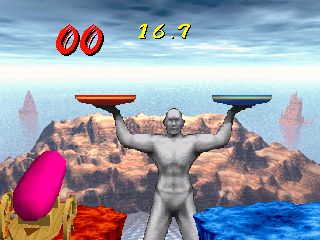
Bishi Bashi Special is a legendary 1998 compilation of Konami’s frantic arcade party games, brought to the PlayStation. Stripping away complex rules in favor of pure, chaotic fun, the game throws players into dozens of rapid-fire, absurd mini-gamesโ€”from shaking up a soda can to tossing pies at a wedding. Its unique charm lies in its blistering pace and simple but highly competitive mechanics, making it one of the most entertaining multiplayer experiences on the console.

How to Play

Your objective in each mini-game is usually explained in a brief, frantic title card before the action begins. Success relies entirely on quick reflexes, pattern recognition, and rapid button mashing. The original arcade cabinets used three massive colored buttons (Red, Green, Blue), which map directly to the PlayStation controller’s face buttons. Use the D-pad for directional mini-games, and be ready to mash the main action buttons as fast as you can. For browser play, default PlayStation mappings assign the D-pad to the arrow keys, and the primary face buttons to Z, X, S, and A.

Tips

  • Pacing is key: In button-mashing events, maintaining a consistent, rapid rhythm is often more effective than bursts of frantic tapping that tire out your hands.
  • Watch the colors: Many mini-games require you to quickly match colors. Memorize which face button corresponds to Red, Green, and Blue before the round starts to avoid hesitation.
  • Read the rules quickly: You only get a few seconds to understand the objective. Focus on the core action (e.g., “Mash!”, “Jump!”) highlighted on the instruction screen.

Player Comments & Discussion: 0 Comments

Leave a Comment / Review:

No comments yet. Be the first gamer to sign the guestbook!

