🎮 Play Battle Hunter Online (PlayStation)

🎲 NEXT RANDOM GAME
Battle Hunter cover art
SAVE SLOTS:

đŸ•šī¸ GAME CONTROLS

Action / ButtonKeyboard Key
D-Pad (Up / Down / Left / Right)Arrow Keys
Button AZ or J
Button BX or K
Button X / Turbo AA or U
Button Y / Turbo BS or I
SelectShift
StartEnter

💡 Tip: You can also connect any USB / Bluetooth Gamepad controller!

Game Rating & Player Reviews: ⭐ Not rated yet
–
☆☆☆☆☆
Be the first to rate
Rate this game (Click 1 to 5 stars):
★ ★ ★ ★ ★

✏️ Suggest an edit to Battle Hunter

🚩 Report Issue with Battle Hunter:

🎮 VISUAL CONTROLLER MAPPING & GAMEPAD DIAGRAM Auto-Detect: Active
L1 / LB R1 / RB SELECT START Y X A B RETRO ARCADE
Gamepad InputRetro FunctionKeyboard Key
D-Pad / AnalogCharacter Movement / Steering▲ â–ŧ ◄ â–ē
Button A (East)Primary Action / Attack / FireZ / K
Button B (South)Secondary / Jump / CancelX / J
Button X / YSpecial / Turbo / Extra FireA / S
SelectInsert Coin / Select OptionRight Shift
StartGame Start / Pause GameEnter
Game info: đŸ‘ī¸ 107 plays
Battle Hunter
box cover
Game title:Battle Hunter
Platform:PlayStation
Emulator Core:PSX
Game Manual: 📖 Official Manual (Built-in)
Share Game:
License:Freeware / Abandonware
Available online emulators for Battle Hunter:

Different online emulators are available for Battle Hunter. Select an emulator core below for optimal performance:

Emulator Core EngineTechnologyMultiplayerGamepadTouchAdsAction / Switch
EmulatorJS (Default WebAssembly) WebAssembly / JSYESYES YESNO â–ļ ACTIVE
PlayStation (Recommended) WebAssembly / LibretroYESYES YESNO PLAY ⚡
Beetle PSX HW WebAssembly / LibretroYESYES YESNO PLAY ⚡
Game description:

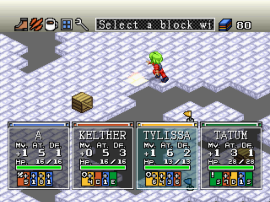
Battle Hunter is a grid-based tactical RPG and digital board game released for the PlayStation in 1999 by Success. Up to four players or AI-controlled rivals compete to navigate randomly generated dungeons, battle monsters, and secure the most valuable relics before the timer runs out or the dungeon collapses. It uniquely blends traditional turn-based strategy with party-game mechanics.

How to Play

The objective is to collect a target relic and successfully escape the dungeon while acquiring as many credits as possible. Players take turns moving across the grid, attacking enemies, playing cards for buffs or traps, and fighting each other to steal items. Controls on a PlayStation emulator typically map the D-pad for movement, Cross (X) to select actions or confirm, Circle (O) to cancel, and Square or Triangle for menus, which map to your keyboard's arrow keys and assigned action buttons (commonly Z, X, A, S, Enter, and Shift).

Tips

  • Keep an eye on your rivals' HP; sometimes it's more effective to let them do the hard work of finding the relic, then ambush them near the exit.
  • Movement points are critical. Prioritize cards or items that boost your speed to outmaneuver opponents.
  • The dungeon layout is randomly generated, so exploring early to find the exit point is just as important as hunting for the relic.

Player Comments & Discussion: 0 Comments

Leave a Comment / Review:

No comments yet. Be the first gamer to sign the guestbook!

