
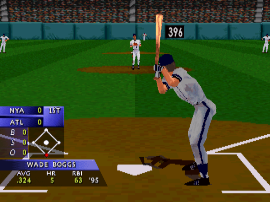
Released in 1996 by Crystal Dynamics, 3D Baseball is a pioneering sports simulation for the PlayStation that brought fully polygonal player models to the diamond. Stepping away from the sprite-based graphics common at the time, this baseball title is best remembered for its signature Batting Stance Generator, which accurately recreated the real-world batting stances of over 50 professional players.
How to Play
Take to the field as your favorite team and guide them to victory in exhibition games or a full pennant race. When playing in the browser, the classic PlayStation controls are mapped to your keyboard: use the arrow keys to aim pitches and run the bases. The primary action buttons (Cross, Circle, Square, Triangle) are mapped to the Z, X, A, and S keys for batting and throwing, while Enter serves as the Start button.
Tips
- Pay close attention to each batter’s unique stance—the realistic animations can help you time your swing more effectively against different pitch types.
- When pitching, constantly mixing up your speeds and locations is critical; relying too heavily on fastballs right down the middle will quickly lead to giving up home runs.
- Listen to the lively play-by-play commentary from Van Earl Wright, as it often provides helpful feedback on your timing and performance.




Leave a Comment / Review: