
🎮 Play Dolphin Online (Atari 2600)

🎲 NEXT RANDOM GAME
Dolphin cover art
SAVE SLOTS:

🕹️ GAME CONTROLS

Action / ButtonKeyboard Key
D-Pad (Up / Down / Left / Right)Arrow Keys
Button AZ or J
Button BX or K
Button X / Turbo AA or U
Button Y / Turbo BS or I
SelectShift
StartEnter

💡 Tip: You can also connect any USB / Bluetooth Gamepad controller!

Game Rating & Player Reviews: ⭐ Not rated yet
☆☆☆☆☆
Be the first to rate
Rate this game (Click 1 to 5 stars):

✏️ Suggest an edit to Dolphin

🚩 Report Issue with Dolphin:

🎮 VISUAL CONTROLLER MAPPING & GAMEPAD DIAGRAM Auto-Detect: Active
L1 / LB R1 / RB SELECT START Y X A B RETRO ARCADE
Gamepad InputRetro FunctionKeyboard Key
D-Pad / AnalogCharacter Movement / Steering
Button A (East)Primary Action / Attack / FireZ / K
Button B (South)Secondary / Jump / CancelX / J
Button X / YSpecial / Turbo / Extra FireA / S
SelectInsert Coin / Select OptionRight Shift
StartGame Start / Pause GameEnter
Game info: 👁️ 122 plays
Dolphin
box cover
Game title:Dolphin
Platform:Atari 2600
Author (released): Activision (1983)
Genre:Action
Mode:Single-player
Game size:4 kB
Emulator Core:ATARI2600
Game Manual: 📖 Official Manual (Built-in)
Share Game:
License:Freeware / Abandonware
Available online emulators for Dolphin:

Different online emulators are available for Dolphin. Select an emulator core below for optimal performance:

Emulator Core EngineTechnologyMultiplayerGamepadTouchAdsAction / Switch
EmulatorJS (Default WebAssembly) WebAssembly / JSYESYES YESNO ▶ ACTIVE
Atari 2600 (Recommended) WebAssembly / LibretroYESYES YESNO PLAY ⚡
Javatari / Stella JS Engine WebAssembly / LibretroYESYES YESNO PLAY ⚡
Game description:

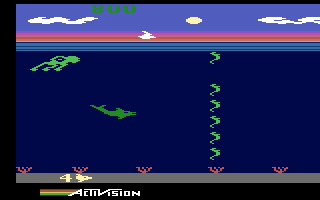
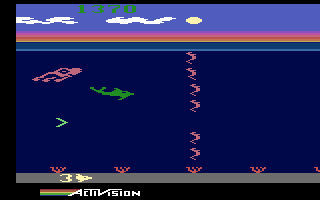
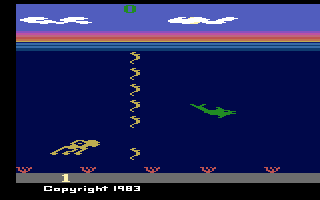
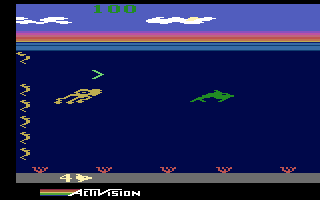
In Dolphin, a 1983 action release by Activision for the Atari 2600, you must guide a dolphin safely through the ocean while being relentlessly pursued by a giant squid. The game is notable for its innovative use of audio cues, requiring players to listen to sonar sounds to navigate through shifting schools of seahorses.

How to Play

Your goal is to outrun the giant squid and survive as long as possible. The pitch of the sonar pings tells you where the gaps in the approaching seahorse schools will be—a high pitch means the gap is at the top, while a low pitch indicates a gap at the bottom. Touching a seahorse slows you down, allowing the squid to catch up. Catching the magic seagull that occasionally flies overhead grants temporary invincibility, turning the tables and letting you chase the squid for bonus points.

Joystick control:


Player 1:Player 2:
joystick↑↓←→TGFH
triggerSpacebarA
turboDel.
RESETF12F12
SELECTF11F11
PauseAlt+PAlt+P
black-white / color mode:  F2
paddle / joystick mode: Alt+L

Tips

  • Pay close attention to the audio; reacting to the pitch of the sonar is faster than waiting to see the gaps on screen.
  • When you catch the seagull, the squid changes color and flees. Use this brief window to swim back and touch the squid for a score boost.
  • Pacing your forward and backward movement is crucial. Sometimes you need to slow down briefly to align with a gap rather than constantly rushing forward.
Screenshots:
Dolphin Screenshot
Dolphin Screenshot
Dolphin Screenshot
Dolphin Screenshot
Player Comments & Discussion: 0 Comments

Leave a Comment / Review:

No comments yet. Be the first gamer to sign the guestbook!