🎮 Play Virtual Pool 64 (USA) Online (Nintendo 64)

🎲 NEXT RANDOM GAME
Virtual Pool 64 (USA) cover art
SAVE SLOTS:

đŸ•šī¸ GAME CONTROLS

Action / ButtonKeyboard Key
D-Pad (Up / Down / Left / Right)Arrow Keys
Button AZ or J
Button BX or K
Button X / Turbo AA or U
Button Y / Turbo BS or I
SelectShift
StartEnter

💡 Tip: You can also connect any USB / Bluetooth Gamepad controller!

Game Rating & Player Reviews: ⭐ Not rated yet
–
☆☆☆☆☆
Be the first to rate
Rate this game (Click 1 to 5 stars):
★ ★ ★ ★ ★

✏️ Suggest an edit to Virtual Pool 64 (USA)

🚩 Report Issue with Virtual Pool 64 (USA):

🎮 VISUAL CONTROLLER MAPPING & GAMEPAD DIAGRAM Auto-Detect: Active
L1 / LB R1 / RB SELECT START Y X A B RETRO ARCADE
Gamepad InputRetro FunctionKeyboard Key
D-Pad / AnalogCharacter Movement / Steering▲ â–ŧ ◄ â–ē
Button A (East)Primary Action / Attack / FireZ / K
Button B (South)Secondary / Jump / CancelX / J
Button X / YSpecial / Turbo / Extra FireA / S
SelectInsert Coin / Select OptionRight Shift
StartGame Start / Pause GameEnter
Game info: đŸ‘ī¸ 104 plays
Virtual Pool 64 (USA)
box cover
Game title:Virtual Pool 64 (USA)
Platform:Nintendo 64
Author (released): Unknown (1998)
Emulator Core:N64
Game Manual: 📖 Official Manual (Built-in)
Share Game:
License:Freeware / Abandonware
Available online emulators for Virtual Pool 64 (USA):

Different online emulators are available for Virtual Pool 64 (USA). Select an emulator core below for optimal performance:

Emulator Core EngineTechnologyMultiplayerGamepadTouchAdsAction / Switch
EmulatorJS (Default WebAssembly) WebAssembly / JSYESYES YESNO â–ļ ACTIVE
Nintendo 64 (Recommended) WebAssembly / LibretroYESYES YESNO PLAY ⚡
ParaLLEl N64 WebAssembly / LibretroYESYES YESNO PLAY ⚡
Game description:

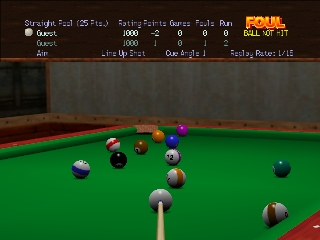
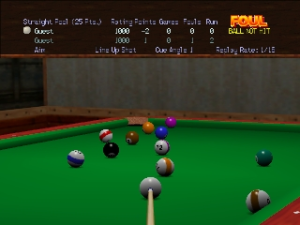
Virtual Pool 64 brings a highly realistic 3D billiards simulation to the Nintendo 64. Released in 1998, it stands out for its accurate physics engine that lets players control English, spin, and cue elevation just like on a real table. With multiple modes including 9-Ball, 8-Ball, and Straight Pool, it offers an authentic parlor experience for both solo practice and multiplayer matches.

How to Play

The objective depends on the chosen pool variant, such as pocketing the 8-ball after your designated group or sinking balls in numerical order in 9-Ball. Use the analog stick to precisely aim your shot and adjust the camera. The D-pad allows you to fine-tune your cue stick’s impact point on the cue ball to apply spin or “English.” Hold down the shot button and pull back on the analog stick to determine the power of your stroke, then push forward to take the shot.

Tips

  • Use the overhead table view to plan your shots and check ball alignments before committing to a strike.
  • Pay close attention to applying backspin or topspin (English); controlling where the cue ball ends up after a shot is crucial for setting up your next move.
  • Practice your stroke power. The analog stick gives you nuanced control, and sometimes a softer touch is more effective than a powerful break.

Player Comments & Discussion: 0 Comments

Leave a Comment / Review:

No comments yet. Be the first gamer to sign the guestbook!