🎮 Play The Legend of the Mystical Ninja Online (SNES)

🎲 NEXT RANDOM GAME
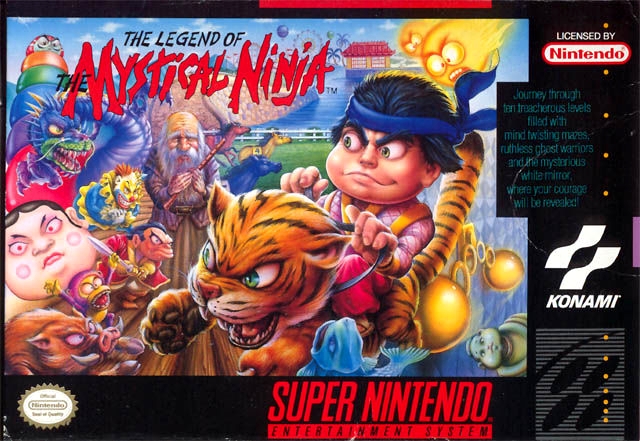
The Legend of the Mystical Ninja cover art
SAVE SLOTS:

đŸ•šī¸ GAME CONTROLS

Action / ButtonKeyboard Key
D-Pad (Up / Down / Left / Right)Arrow Keys
Button AZ or J
Button BX or K
Button X / Turbo AA or U
Button Y / Turbo BS or I
SelectShift
StartEnter

💡 Tip: You can also connect any USB / Bluetooth Gamepad controller!

Game Rating & Player Reviews: ⭐ Not rated yet
–
☆☆☆☆☆
Be the first to rate
Rate this game (Click 1 to 5 stars):
★ ★ ★ ★ ★

✏️ Suggest an edit to The Legend of the Mystical Ninja

🚩 Report Issue with The Legend of the Mystical Ninja:

🎮 VISUAL CONTROLLER MAPPING & GAMEPAD DIAGRAM Auto-Detect: Active
L1 / LB R1 / RB SELECT START Y X A B RETRO ARCADE
Gamepad InputRetro FunctionKeyboard Key
D-Pad / AnalogCharacter Movement / Steering▲ â–ŧ ◄ â–ē
Button A (East)Primary Action / Attack / FireZ / K
Button B (South)Secondary / Jump / CancelX / J
Button X / YSpecial / Turbo / Extra FireA / S
SelectInsert Coin / Select OptionRight Shift
StartGame Start / Pause GameEnter
Game info: đŸ‘ī¸ 111 plays
The Legend of the Mystical Ninja
box cover
Game title:The Legend of the Mystical Ninja
Platform:SNES
Author (released): Konami (1991)
Genre:Action, Platform
Mode:Multiplayer
Game size:833 kB
Emulator Core:SNES
Game Manual: 📖 Official Manual (Built-in)
Share Game:
License:Freeware / Abandonware
Available online emulators for The Legend of the Mystical Ninja:

Different online emulators are available for The Legend of the Mystical Ninja. Select an emulator core below for optimal performance:

Emulator Core EngineTechnologyMultiplayerGamepadTouchAdsAction / Switch
EmulatorJS (Default WebAssembly) WebAssembly / JSYESYES YESNO â–ļ ACTIVE
SNES / Super Famicom (Recommended) WebAssembly / LibretroYESYES YESNO PLAY ⚡
Game description:

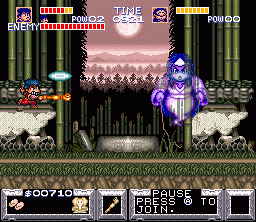
Developed by Konami in 1991, The Legend of the Mystical Ninja is a defining action-platformer for the SNES. Stepping into the sandals of Kid Ying and Dr. Yang, players explore a vibrant, distinctly Japanese world that seamlessly blends top-down town exploration with challenging side-scrolling action. You can visit shops to upgrade equipment, play minigames, and then head into hostile territory to platform your way through enemy strongholds, making it unusually deep for a 16-bit title.

How to play

Your goal is to journey across the country to rescue Princess Yuki, fighting through stages filled with enemy ninjas and mythological creatures. The game supports two-player co-op, famously allowing the second player to jump on the first player’s shoulders to navigate tricky platforming sections together.

Gamepad control:


direction buttons


↑↓←→
action button A Z
action button B X
action buttons X, Y A, S
shoulder buttons L, R Q, E
SELECT Shift
START Enter

Tips

  • Buy sandals: In towns, buying straw sandals upgrades your movement speed, which is essential for dodging projectiles. Upgrading your pipe also increases your primary attack range.
  • Save your Ryo: Coins act as both currency for shops and ammunition for your ranged throw attack. Don’t throw all your money away if you need health or upgrades in the next town.
  • Use the piggyback move: In two-player mode, having one character ride on the other’s shoulders is incredibly useful for bypassing difficult platforming segments if one player is struggling.
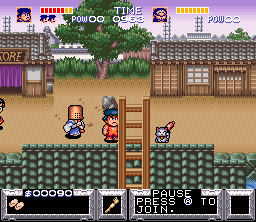
Screenshots:
The Legend of the Mystical Ninja Screenshot
Player Comments & Discussion: 0 Comments

Leave a Comment / Review:

No comments yet. Be the first gamer to sign the guestbook!