๐ŸŽฎ Play Tennis Online (Atari 2600)

๐ŸŽฒ NEXT RANDOM GAME
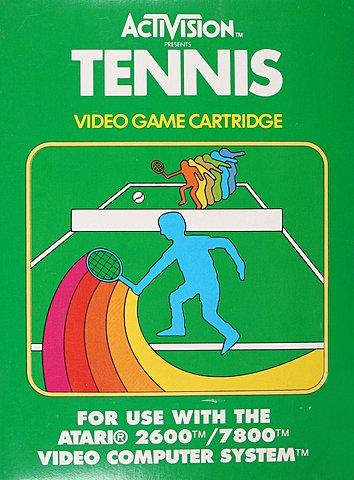
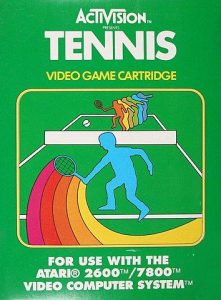
Tennis cover art
SAVE SLOTS:

๐Ÿ•น๏ธ GAME CONTROLS

Action / ButtonKeyboard Key
D-Pad (Up / Down / Left / Right)Arrow Keys
Button AZ or J
Button BX or K
Button X / Turbo AA or U
Button Y / Turbo BS or I
SelectShift
StartEnter

๐Ÿ’ก Tip: You can also connect any USB / Bluetooth Gamepad controller!

Game Rating & Player Reviews: โญ Not rated yet
โ€“
โ˜†โ˜†โ˜†โ˜†โ˜†
Be the first to rate
Rate this game (Click 1 to 5 stars):
โ˜… โ˜… โ˜… โ˜… โ˜…

✏️ Suggest an edit to Tennis

๐Ÿšฉ Report Issue with Tennis:

๐ŸŽฎ VISUAL CONTROLLER MAPPING & GAMEPAD DIAGRAM Auto-Detect: Active
L1 / LB R1 / RB SELECT START Y X A B RETRO ARCADE
Gamepad InputRetro FunctionKeyboard Key
D-Pad / AnalogCharacter Movement / Steeringโ–ฒ โ–ผ โ—„ โ–บ
Button A (East)Primary Action / Attack / FireZ / K
Button B (South)Secondary / Jump / CancelX / J
Button X / YSpecial / Turbo / Extra FireA / S
SelectInsert Coin / Select OptionRight Shift
StartGame Start / Pause GameEnter
Game info: ๐Ÿ‘๏ธ 116 plays
Tennis
box cover
Game title:Tennis
Platform:Atari 2600
Author (released): Activision (1981)
Genre:Sport
Mode:Multiplayer
Game size:2 kB
Emulator Core:ATARI2600
Game Manual: ๐Ÿ“– Official Manual (Built-in)
Share Game:
License:Freeware / Abandonware
Available online emulators for Tennis:

Different online emulators are available for Tennis. Select an emulator core below for optimal performance:

Emulator Core EngineTechnologyMultiplayerGamepadTouchAdsAction / Switch
EmulatorJS (Default WebAssembly) WebAssembly / JSYESYES YESNO โ–ถ ACTIVE
Atari 2600 (Recommended) WebAssembly / LibretroYESYES YESNO PLAY โšก
Javatari / Stella JS Engine WebAssembly / LibretroYESYES YESNO PLAY โšก
Game description:

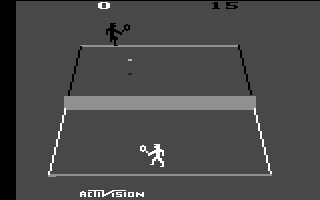
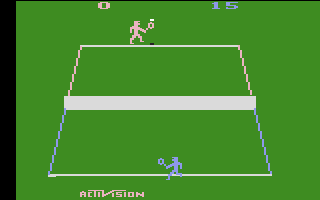
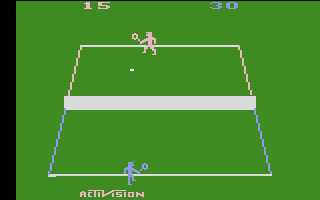
Tennis is a 1981 sports game developed by Alan Miller for Activision on the Atari 2600. Offering fast-paced single-player and head-to-head competition, it was one of the earliest home console adaptations to capture the flow of real tennis, featuring an angled court view, baseline rallies, net volleys, and complete match scoring.

How it plays

Position your player across the court to serve, return, and volley. In single-player mode, compete against the console AI; in two-player mode, go head-to-head on the same keyboard or gamepads. The game follows standard tennis scoring, counting points through games and sets.

Default Controls (Browser):

  • Player 1: Arrow keys to move, Spacebar to serve and hit shots.
  • Player 2: T/G/F/H to move, A to serve and hit shots.
  • Console Switches: F12 for Game Reset, F11 for Game Select.

Tips for winning matches

  • Approach the net: After a strong serve or deep baseline shot, move toward the net to intercept returns with quick volleys before your opponent recovers.
  • Control shot placement: Your shot direction depends on positioning relative to the ballโ€”strike near the edge of your motion to hit cross-court winners.
Screenshots:
Tennis Screenshot
Tennis Screenshot
Tennis Screenshot
Player Comments & Discussion: 0 Comments

Leave a Comment / Review:

No comments yet. Be the first gamer to sign the guestbook!