🎮 Play Star Wars: The Empire Strikes Back Online (NES)

🎲 NEXT RANDOM GAME
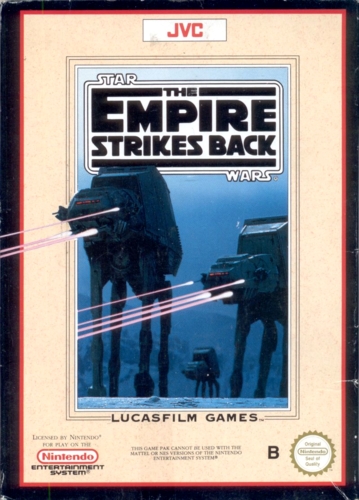
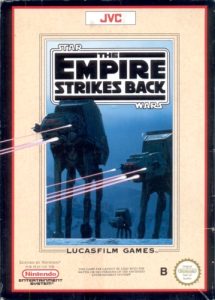
Star Wars: The Empire Strikes Back cover art
SAVE SLOTS:

đŸ•šī¸ GAME CONTROLS

Action / ButtonKeyboard Key
D-Pad (Up / Down / Left / Right)Arrow Keys
Button AZ or J
Button BX or K
Button X / Turbo AA or U
Button Y / Turbo BS or I
SelectShift
StartEnter

💡 Tip: You can also connect any USB / Bluetooth Gamepad controller!

Game Rating & Player Reviews: ⭐ Not rated yet
–
☆☆☆☆☆
Be the first to rate
Rate this game (Click 1 to 5 stars):
★ ★ ★ ★ ★

✏️ Suggest an edit to Star Wars: The Empire Strikes Back

🚩 Report Issue with Star Wars: The Empire Strikes Back:

🎮 VISUAL CONTROLLER MAPPING & GAMEPAD DIAGRAM Auto-Detect: Active
L1 / LB R1 / RB SELECT START Y X A B RETRO ARCADE
Gamepad InputRetro FunctionKeyboard Key
D-Pad / AnalogCharacter Movement / Steering▲ â–ŧ ◄ â–ē
Button A (East)Primary Action / Attack / FireZ / K
Button B (South)Secondary / Jump / CancelX / J
Button X / YSpecial / Turbo / Extra FireA / S
SelectInsert Coin / Select OptionRight Shift
StartGame Start / Pause GameEnter
Game info: đŸ‘ī¸ 109 plays
Star Wars: The Empire Strikes Back
box cover
Game title:Star Wars: The Empire Strikes Back
Platform:NES
Author (released): Lucasfilm Games (1992)
Genre:Action, Platform
Mode:Single-player
Game size:303 kB
Emulator Core:NES
Game Manual: 📖 Official Manual (Built-in)
Share Game:
License:Freeware / Abandonware
Available online emulators for Star Wars: The Empire Strikes Back:

Different online emulators are available for Star Wars: The Empire Strikes Back. Select an emulator core below for optimal performance:

Emulator Core EngineTechnologyMultiplayerGamepadTouchAdsAction / Switch
EmulatorJS (Default WebAssembly) WebAssembly / JSYESYES YESNO â–ļ ACTIVE
NES / Famicom (Recommended) WebAssembly / LibretroYESYES YESNO PLAY ⚡
Nestopia UE (Accurate) WebAssembly / LibretroYESYES YESNO PLAY ⚡
Game description:

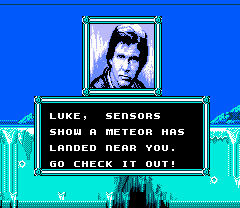
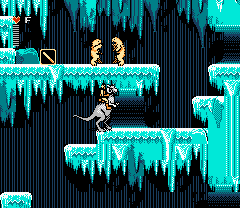
Lucasfilm Games brought the second chapter of the original trilogy to the NES in 1992 with an action-platformer that pushes both the 8-bit hardware and the player hard. As Luke Skywalker, you battle through the icy plains of Hoth, the dense swamps of Dagobah, and the treacherous corridors of Cloud City. The game gives you a blaster and a lightsaber right away, but you gradually unlock Force powers as you train under Yoda and prepare to face Darth Vader.

How to play

Your goal is to survive sprawling, maze-like levels filled with Imperial forces and hazardous jumps. You can switch between your blaster and lightsaber depending on the situation, and must manage your limited Force points carefully once you unlock abilities like Force Heal and Levitate.

Use the arrow keys to move, duck, and aim, while the action keys handle jumping and attacking. You can toggle your current weapon with the Select button.

Gamepad control:


Player 1:

Player 2:

↑

↑

↓

↓

←

←
→ →
A X
B Z

SELECT

Shift


START

Enter

Tips

  • Master the Super Jump: Even before unlocking Force abilities, Luke can perform a high jump. Hold Down on the D-pad until your character flashes, then jump. You absolutely need this to cross large gaps.
  • Lock your firing angle: The game lets you fire your blaster in multiple directions. Once you start shooting at an angle, you can keep the button held to lock that direction while retreating from enemies.
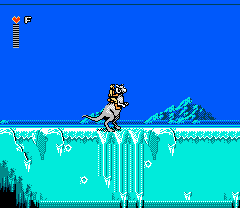
  • Keep your ride alive: On the first Hoth level, try to hold onto your Tauntaun as long as possible. The extra speed makes navigating the icy terrain much easier and provides a vital damage buffer.
Screenshots:
Star Wars: The Empire Strikes Back Screenshot
Player Comments & Discussion: 0 Comments

Leave a Comment / Review:

No comments yet. Be the first gamer to sign the guestbook!