🎮 Play Solomon’s Key 2 Online (NES)

🎲 NEXT RANDOM GAME
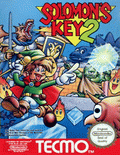
Solomon’s Key 2 cover art
SAVE SLOTS:

🕹️ GAME CONTROLS

Action / ButtonKeyboard Key
D-Pad (Up / Down / Left / Right)Arrow Keys
Button AZ or J
Button BX or K
Button X / Turbo AA or U
Button Y / Turbo BS or I
SelectShift
StartEnter

💡 Tip: You can also connect any USB / Bluetooth Gamepad controller!

Game Rating & Player Reviews: ⭐ Not rated yet
☆☆☆☆☆
Be the first to rate
Rate this game (Click 1 to 5 stars):

✏️ Suggest an edit to Solomon’s Key 2

🚩 Report Issue with Solomon’s Key 2:

🎮 VISUAL CONTROLLER MAPPING & GAMEPAD DIAGRAM Auto-Detect: Active
L1 / LB R1 / RB SELECT START Y X A B RETRO ARCADE
Gamepad InputRetro FunctionKeyboard Key
D-Pad / AnalogCharacter Movement / Steering
Button A (East)Primary Action / Attack / FireZ / K
Button B (South)Secondary / Jump / CancelX / J
Button X / YSpecial / Turbo / Extra FireA / S
SelectInsert Coin / Select OptionRight Shift
StartGame Start / Pause GameEnter
Game info: 👁️ 127 plays
Solomon’s Key 2
box cover
Game title:Solomon’s Key 2
Platform:NES
Author (released): Tecmo, Ltd. (1992)
Genre:Puzzle
Mode:Single-player
Game size:131 kB
Emulator Core:NES
Game Manual: 📖 Official Manual (Built-in)
Share Game:
License:Freeware / Abandonware
Available online emulators for Solomon’s Key 2:

Different online emulators are available for Solomon’s Key 2. Select an emulator core below for optimal performance:

Emulator Core EngineTechnologyMultiplayerGamepadTouchAdsAction / Switch
EmulatorJS (Default WebAssembly) WebAssembly / JSYESYES YESNO ▶ ACTIVE
NES / Famicom (Recommended) WebAssembly / LibretroYESYES YESNO PLAY ⚡
Nestopia UE (Accurate) WebAssembly / LibretroYESYES YESNO PLAY ⚡
Game description:

Developed by Tecmo in 1992, Solomon’s Key 2 (also known as Fire ‘n Ice) is a clever NES puzzle game. You play as Dana the wizard, tasked with extinguishing all the flames in each room. Rather than focusing on quick platforming action, the game requires careful block manipulation and finding the exact sequence of moves to clear the screen.

How to Play

Your objective is to extinguish all the fires on the board by dropping or pushing ice blocks onto them. You can conjure and destroy ice blocks diagonally below your character, and push existing blocks by walking into them. Use the Arrow Keys to move, press X to conjure or break ice blocks, and press Shift to restart the current room if you make a mistake.

Tips

  • Ice blocks will slide continuously when pushed until they hit a wall or another block. You will often need to create temporary ice blocks to act as stoppers.
  • You can create an ice block diagonally below you while falling, which is an essential technique for navigating many tricky drops.
  • If an ice block is supported from below, it will stay in place even if you remove adjacent blocks, allowing you to build complex stairs and bridges.
Screenshots:
Solomon’s Key 2 Screenshot
Player Comments & Discussion: 0 Comments

Leave a Comment / Review:

No comments yet. Be the first gamer to sign the guestbook!



