🎮 Play Shin Megami Tensei if… (English) Online (SNES)

🎲 NEXT RANDOM GAME
Shin Megami Tensei if… (English) cover art
SAVE SLOTS:

đŸ•šī¸ GAME CONTROLS

Action / ButtonKeyboard Key
D-Pad (Up / Down / Left / Right)Arrow Keys
Button AZ or J
Button BX or K
Button X / Turbo AA or U
Button Y / Turbo BS or I
SelectShift
StartEnter

💡 Tip: You can also connect any USB / Bluetooth Gamepad controller!

Game Rating & Player Reviews: ⭐ Not rated yet
–
☆☆☆☆☆
Be the first to rate
Rate this game (Click 1 to 5 stars):
★ ★ ★ ★ ★

✏️ Suggest an edit to Shin Megami Tensei if… (English)

🚩 Report Issue with Shin Megami Tensei if… (English):

🎮 VISUAL CONTROLLER MAPPING & GAMEPAD DIAGRAM Auto-Detect: Active
L1 / LB R1 / RB SELECT START Y X A B RETRO ARCADE
Gamepad InputRetro FunctionKeyboard Key
D-Pad / AnalogCharacter Movement / Steering▲ â–ŧ ◄ â–ē
Button A (East)Primary Action / Attack / FireZ / K
Button B (South)Secondary / Jump / CancelX / J
Button X / YSpecial / Turbo / Extra FireA / S
SelectInsert Coin / Select OptionRight Shift
StartGame Start / Pause GameEnter
Game info: đŸ‘ī¸ 89 plays
Shin Megami Tensei if… (English)
box cover
Game title:Shin Megami Tensei if… (English)
Platform:SNES
Author (released): Unknown (1994)
Emulator Core:SNES
Game Manual: 📖 Official Manual (Built-in)
Share Game:
License:Freeware / Abandonware
Available online emulators for Shin Megami Tensei if… (English):

Different online emulators are available for Shin Megami Tensei if… (English). Select an emulator core below for optimal performance:

Emulator Core EngineTechnologyMultiplayerGamepadTouchAdsAction / Switch
EmulatorJS (Default WebAssembly) WebAssembly / JSYESYES YESNO â–ļ ACTIVE
SNES / Super Famicom (Recommended) WebAssembly / LibretroYESYES YESNO PLAY ⚡
Game description:

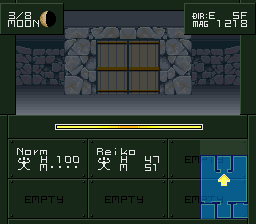
Released by Atlus in 1994, Shin Megami Tensei if… is a landmark Super Nintendo RPG that shifted the series’ traditional post-apocalyptic setting to a high school transported into the demon realm. As a pioneering dungeon crawler that heavily influenced the later Persona series, it challenges players to navigate first-person labyrinths, negotiate with demons, and align with different human partners to survive the demonic invasion of Karukozaka High.

How to Play

Your primary objective is to explore the demonic domains, recruit demons into your party, and find a way to return your school to the human world. In the browser emulator, use the Arrow Keys to navigate menus and dungeons. Press Z and X (mapped to the SNES A and B buttons) to confirm or cancel actions, and A and S (mapped to X and Y) for secondary menu functions. Enter serves as the Start button to pause or open the main menu, while Shift acts as Select.

Tips

  • Understand the Guardian System: When your character falls in battle, they are revived with a Guardian spirit. This Guardian alters your stats and grants new magic spells, making strategic deaths a unique way to adjust your character’s build.
  • Negotiate Early and Often: Human characters cannot rely solely on physical attacks, making demon allies essential. Talk to demons during encounters to recruit them, keeping in mind that your current alignment affects who will join you.
  • Choose Your Partner Wisely: The human companion you align with at the start of the game drastically changes the dungeons you explore, the story path, and the overall difficulty.


https://www.romhacking.net/translations/3951/

Player Comments & Discussion: 0 Comments

Leave a Comment / Review:

No comments yet. Be the first gamer to sign the guestbook!