🎮 Play Penguin Kun Wars Online (NES)

🎲 NEXT RANDOM GAME
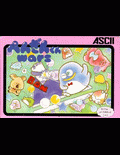
Penguin Kun Wars cover art
SAVE SLOTS:

đŸ•šī¸ GAME CONTROLS

Action / ButtonKeyboard Key
D-Pad (Up / Down / Left / Right)Arrow Keys
Button AZ or J
Button BX or K
Button X / Turbo AA or U
Button Y / Turbo BS or I
SelectShift
StartEnter

💡 Tip: You can also connect any USB / Bluetooth Gamepad controller!

Game Rating & Player Reviews: ⭐ Not rated yet
–
☆☆☆☆☆
Be the first to rate
Rate this game (Click 1 to 5 stars):
★ ★ ★ ★ ★

✏️ Suggest an edit to Penguin Kun Wars

🚩 Report Issue with Penguin Kun Wars:

🎮 VISUAL CONTROLLER MAPPING & GAMEPAD DIAGRAM Auto-Detect: Active
L1 / LB R1 / RB SELECT START Y X A B RETRO ARCADE
Gamepad InputRetro FunctionKeyboard Key
D-Pad / AnalogCharacter Movement / Steering▲ â–ŧ ◄ â–ē
Button A (East)Primary Action / Attack / FireZ / K
Button B (South)Secondary / Jump / CancelX / J
Button X / YSpecial / Turbo / Extra FireA / S
SelectInsert Coin / Select OptionRight Shift
StartGame Start / Pause GameEnter
Game info: đŸ‘ī¸ 131 plays
Penguin Kun Wars
box cover
Game title:Penguin Kun Wars
Platform:NES
Author (released): ASCII Corporation (1985)
Genre:Action
Mode:Multiplayer
Game size:40 kB
Emulator Core:NES
Game Manual: 📖 Official Manual (Built-in)
Share Game:
License:Freeware / Abandonware
Available online emulators for Penguin Kun Wars:

Different online emulators are available for Penguin Kun Wars. Select an emulator core below for optimal performance:

Emulator Core EngineTechnologyMultiplayerGamepadTouchAdsAction / Switch
EmulatorJS (Default WebAssembly) WebAssembly / JSYESYES YESNO â–ļ ACTIVE
NES / Famicom (Recommended) WebAssembly / LibretroYESYES YESNO PLAY ⚡
Nestopia UE (Accurate) WebAssembly / LibretroYESYES YESNO PLAY ⚡
Game description:

Penguin Kun Wars is a 1985 competitive action game published by ASCII Corporation for the NES. You choose from a roster of cartoon animals and face an opponent across a split court, throwing balls at each other while scrambling to clear your own side. When the timer runs out, the player with fewer balls remaining on their half wins. The mechanics take seconds to understand and rounds are short enough that you will want to play several in a row.

How to play

Move around your half of the court with the arrow keys. Walk up to a ball and press Z (NES B) to throw it toward your opponent. You can only hold one ball at a time, so collect and throw quickly — the more balls you return per second, the harder you make it for your opponent to keep up. Press Enter to start a match.

ActionKey
MoveArrow keys
ThrowZ
A buttonX
StartEnter
SelectShift

Tips

  • Keep moving at all times — standing still lets balls accumulate behind you, and clearing a cluster takes much longer than preventing one.
  • Aim for the far corners of your opponent’s side; a ball thrown deep into a corner takes them longer to reach and return.
  • Throw as soon as you pick up a ball rather than repositioning. Close, rapid throws keep constant pressure on your opponent and leave them less time to set up their own throws.
Screenshots:
Penguin Kun Wars Screenshot
Player Comments & Discussion: 0 Comments

Leave a Comment / Review:

No comments yet. Be the first gamer to sign the guestbook!



