๐ŸŽฎ Play Microsoft Decathlon Online (DOS)

๐ŸŽฒ NEXT RANDOM GAME
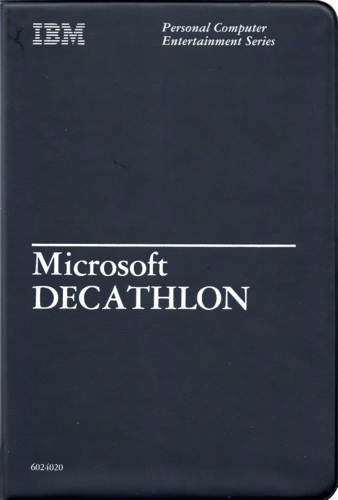
Microsoft Decathlon cover art
SAVE SLOTS:

๐Ÿ•น๏ธ GAME CONTROLS

Action / ButtonKeyboard Key
D-Pad (Up / Down / Left / Right)Arrow Keys
Button AZ or J
Button BX or K
Button X / Turbo AA or U
Button Y / Turbo BS or I
SelectShift
StartEnter

๐Ÿ’ก Tip: You can also connect any USB / Bluetooth Gamepad controller!

Game Rating & Player Reviews: โญ Not rated yet
โ€“
โ˜†โ˜†โ˜†โ˜†โ˜†
Be the first to rate
Rate this game (Click 1 to 5 stars):
โ˜… โ˜… โ˜… โ˜… โ˜…

✏️ Suggest an edit to Microsoft Decathlon

๐Ÿšฉ Report Issue with Microsoft Decathlon:

๐ŸŽฎ VISUAL CONTROLLER MAPPING & GAMEPAD DIAGRAM Auto-Detect: Active
L1 / LB R1 / RB SELECT START Y X A B RETRO ARCADE
Gamepad InputRetro FunctionKeyboard Key
D-Pad / AnalogCharacter Movement / Steeringโ–ฒ โ–ผ โ—„ โ–บ
Button A (East)Primary Action / Attack / FireZ / K
Button B (South)Secondary / Jump / CancelX / J
Button X / YSpecial / Turbo / Extra FireA / S
SelectInsert Coin / Select OptionRight Shift
StartGame Start / Pause GameEnter
Game info: ๐Ÿ‘๏ธ 140 plays
Microsoft Decathlon
box cover
Game title:Microsoft Decathlon
Platform:DOS
Author (released): Microsoft (1982)
Genre:Sport
Mode:Multiplayer
Game size:109 kB
Emulator Core:DOS
Game Manual: ๐Ÿ“– Official Manual (Built-in)
Share Game:
License:Freeware / Abandonware
Available online emulators for Microsoft Decathlon:

Different online emulators are available for Microsoft Decathlon. Select an emulator core below for optimal performance:

Emulator Core EngineTechnologyMultiplayerGamepadTouchAdsAction / Switch
EmulatorJS (Default WebAssembly) WebAssembly / JSYESYES YESNO โ–ถ ACTIVE
MS-DOS (Recommended) WebAssembly / LibretroYESYES YESNO PLAY โšก
JS-DOS v3.0 / DOSBox Engine Emscripten C++YESYES NONO PLAY โšก
Game description:

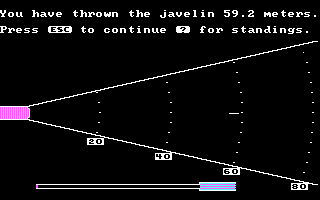
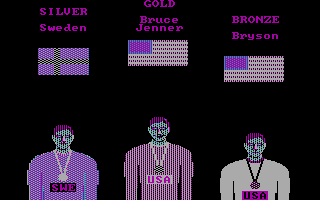
Microsoft Decathlon is a classic track and field sports game developed by Timothy W. Smith and published by Microsoft for DOS in 1982. Bringing the grueling ten-event athletic competition to early PCs, it challenges players to compete in a full decathlon, ranging from the 100-meter dash to the 1500-meter run. Known as one of the original “keyboard smashers,” it tests both reflexes and endurance as you strive to break world records or compete against friends in local multiplayer.

How to play

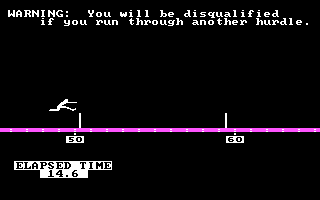
The goal is to score as many points as possible across ten sequential track and field events: 100m dash, long jump, shot put, high jump, 400m dash, 110m hurdles, discus, pole vault, javelin, and 1500m run. You must rely on rapid key alternating to build up speed for running events, and use precise timing with the action key to jump or throw. Because DOS games lack a standard controller, keys vary depending on the selected control scheme at boot, but alternating directional keys to run and the spacebar to jump or throw is a common configuration.

Tips

  • Pace yourself in the 1500m: Unlike the sprints, the 1500-meter run requires stamina management. Running at maximum speed early on will exhaust your athlete; maintain a steady rhythm until the final stretch.
  • Master the release angles: In throwing events like the javelin and shot put, speed is only half the battle. Releasing the projectile at an optimal 45-degree angle is crucial for maximum distance.
  • Practice the pole vault: It is often the most complex event, requiring a perfect combination of approach speed, planting the pole at the right moment, and shifting your weight to clear the bar.
Screenshots:
Microsoft Decathlon Screenshot
Player Comments & Discussion: 0 Comments

Leave a Comment / Review:

No comments yet. Be the first gamer to sign the guestbook!